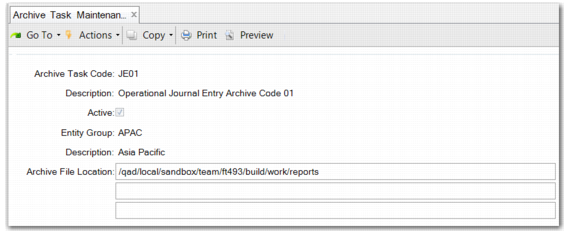
Archive Task Maintenance
Before you perform any archive action, create an archive task code. The code can be used to archive journal entries by entity or by entity group. If you are running a large corporate group with many entities in the database, you can reduce work by running archive by entity group across domains.
Note: Archive Task Maintenance is only for operational journal entries.
Archive Task Maintenance
Archive Task Code
Enter a unique archive task code.
Description
Enter a brief description of the archive task code.
Active
Select this field to activate the archive task code.
Note: When an archive task code has been used, you can deactivate the task code. However, you cannot delete it, because if you need to restore the archive files, the system needs to reuse the original archive file location and task code.
Entity Group
Specify a code that identifies the entity group. To reduce work, you can archive for multiple entities across domains. This field is mandatory.
Archive File Location
By default, this field contains the file location specified in Archive Configuration Maintenance. However, you can define a different archive file location, depending on the definition of the archive task.