Data Archive
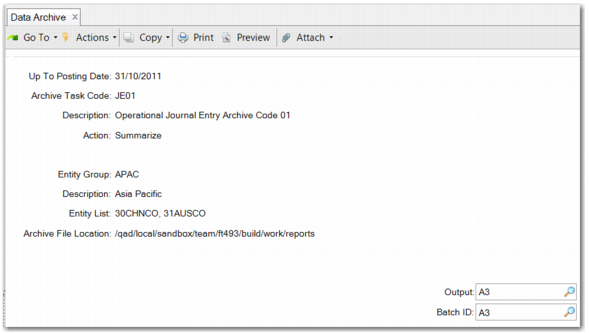
In Data Archive (36.23.4.1), you can perform the Estimate, Archive, or Summarize actions. Enter an Up To Posting Date, an Archive Task Code, and choose an action. The associated entity group and file information are read only.
For the Estimate action, you can output to page. For the Archive and Summarize actions, you must schedule a batch, because these actions can take a long time given the large number of journal entries in your database.
Data Archive
Up to Posting Date
Specify a cut-off posting date for archiving journal entries. The system uses the posting date to find the corresponding GL period for the entity with an end date before or on the specified date. The system archives data from the earliest period that has not been archived up to and including the specified period. This method ensures that there are never gaps in the archived periods.
Archive Task Code
Enter the code you created in Archive Task Maintenance. Only active task codes can be used during the execution.
Action
There are three actions in Data Archive: Estimate, Archive, and Summarize. The Estimate action produces a report with a brief overview of the following information:
• Archive file information
• Number of periods
• Number of postings and posting lines to be archived
• Number of postings and posting lines to be summarized
• Archive file size
• Database space to free up
It is recommended that you run the Estimate report before you archive or summarize periods.
The Archive action creates the data archive files. After an archive file is created, the system generates a report to display archive results, including summary information and entity details. In the summary section, the report displays the totals for the entities you selected. The entity section displays the details for each entity separately, including details per year and period. You can see how many postings and posting lines have been archived, as well as file name, file size, and file location information.
The Summarize action enables you to remove journal entries from the database and to create a summarized journal entry to keep the account balances. The system generates a report to display the results.
Action
When you run an action in batch mode, you can enter a value in the Output field. A .prn report file with the same name is then generated in the QAD standard report folder.
It is recommended to first run the Estimate action and check the simulation report for an overview of the expected result. Next, run the Archive action to create the archive files. Finally, run the Summarize action to remove the journal entries from the database and to create new summarized journal entries to keep the account balances.
Note: When journal entry records are deleted, the database size is not immediately reduced. The size of the database is governed by the High Water Mark (HWM) of each storage area. PROBKUP, for example, backs up every database storage area block up to its HWM. Deleting records does not lower the HWM. There are two ways to lower the HWM of a storage area:
• Dump the data in the storage area, remove and recreate the storage area, and then reload the definitions and data.
• Move the data into a new storage area using the command PROUTIL -C TABLEMOVE. Then, remove the existing storage area using the command PROSTRCT REMOVE.
Batch ID
Specify an operational batch ID to process the menu. For the Estimate action, you can output to page. However, for other actions, Batch ID is a mandatory field.