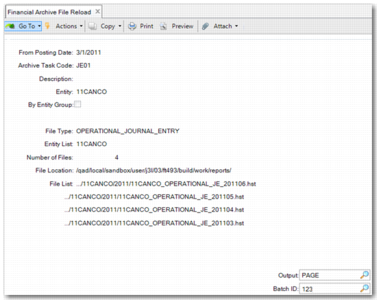
Financial Archive File Reload
To recover archived data, use Financial Archive File Reload (36.23.4.4). This program enables you to:
• Remove the summarized journal entries
• Reload the original journal entries
• Reload from the latest summarized period
When you reload archive files, the system first removes the summarized journal entry and puts the data from the archive file back into the database exactly as it was before you deleted it. The COA balance does not change.
Note: To reload archive files that have been moved from their original file path, you must move the files back to their original location before loading. You can find the original file path by running the Archive Audit Trail Report or by browsing the archive file folder hierarchy.
Important: You can only reload a file with the same schema. For example, an archive file created in QAD 2016 EE can only reloaded in 2016 EE. After you upgrade your QAD version, archive files created with previous versions can no longer be loaded. Generally, however, you only need to restore a file in case of error, and these errors should be recognized shortly after you summarize journal entries.
Financial Archive File Reload
From Posting Date
Specify a posting date that the system uses to find the GL period for each entity.
Note: An archive file is generated in chronological order. The file is reloaded in reverse order, beginning with the latest summarized period. For example, you summarized journal entries up to December 2015 and you want to reload the file from October 1, 2015. This means that you restore three periods; October, November, and December. The system first reloads December, then November, and, finally, October.
Archive Task Code
You must reuse the archive task code that you used when you ran Data Archive. The system looks in the original archive file location to reload files.
Entity, By Entity Group
You can restore files by entity or by entity group. The fields are mutually exclusive.
Batch ID
As with the Archive and Summarize actions, you must schedule a batch to process the reload.
After you complete these fields, the entity and archive file information are displayed as read only.
After archive files are reloaded, the system creates a .prn report file containing the reload status and detailed results. The report structure is the same as the data archive report.