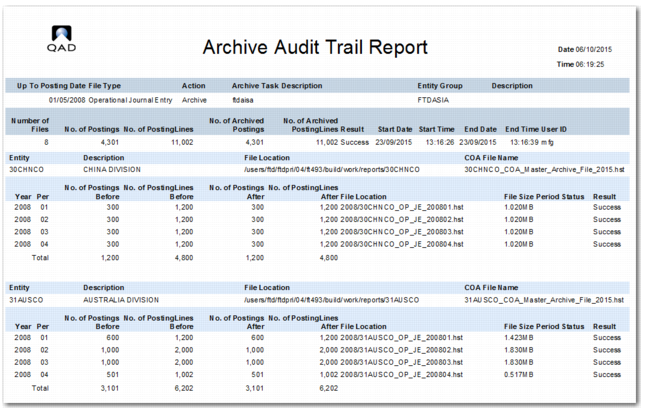
Archive Audit Trail Report
When you archive, rearchive, summarize, or reload a file; the system stores audit trail information in an XML file. After execution, you can run Archive Audit Trail Report to check archive status and detailed result information. This report contains three sections:
• Header summary
• Entity detail
• Message
The header summary section displays summary information such as posting date, file type, action, entity group, total number of postings and posting lines, execution data, and time.
The entity detail section displays detailed information for each year and period. It also displays any errors encountered.
The dataset contains other fields that you can add to the report layout in Design Mode.
Note: For data security, it is recommended that you also archive the XML files for task configuration, archive task, and audit trail. You can copy the XML files to another storage media along with the normal archive files.
The three XML files created when you run the data archive function—ArchveConfig.xml, ArchiveTask.xml, and ArchiveAuditTrail.xml—are stored in the same folder as cbsever.xml. The file path depends on the client installation location.
Archive Audit Trail Report