Advanced Self-Billing Invoicing
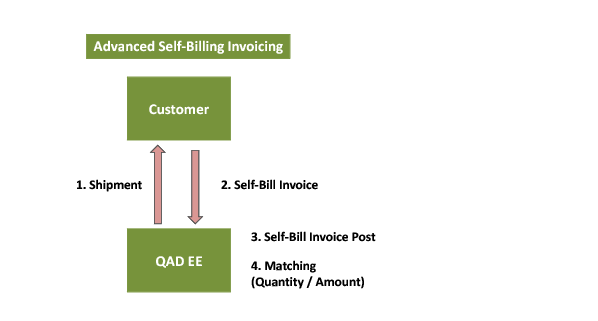
The financial side of Advanced Self-Billing invoicing is described in detail in this chapter. In the Advanced Self-Billing process, the supplier ships the goods. However, the customer creates the invoice and sends it to supplier. The supplier loads the invoice and posts it to AR. The customer then sends payment.
The fundamental difference with this process is that it is the customer who creates the invoice, based on what they have received or used. The supplier receives that invoice, typically using EDI. The invoice is posted into the supplier system and is compared with the shipment information, using automatic matching algorithms that minimize the need for manual reconciliation. Any differences are discussed with the customer, who may need to make adjustments on their side that are subsequently processed as additional invoices. Because the customer creates the invoices, the supplier can be confident of payment.
There is also the option of creating an accrual at time of shipment to recognize the value of shipments that have not been invoiced. These accruals are reversed when the self-bill invoice is posted. The Advanced Self-Billing solution also postpones the creation of the internal invoice until the customer-created invoice is received, and therefore also delays the recording of VAT.
For a full description of how to set up Advanced Self-Billing, see
QAD Sales User Guide.
Advanced Self-Billing Invoicing Process