Shipment Revaluation
Shipment Revaluation functionality is used to modify the price of all self-billing shipments for a specific customer and/or item. Shipment revaluation works on both the unmatched shippers and the matched shippers. The shipment revaluation process automatically unmatches the selected shippers and changes the shipper price at the same time.
Shipment Revaluation programs include:
• Shipment Revaluation Price Maint
• Self-Bill Shipment Revaluation
• Shipment Revaluation price Report
Changing Item Price
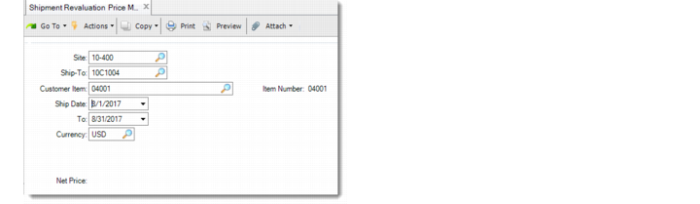
Use Shipment Revaluation Price Maint to change the item price.
Shipment Revaluation Price Maint
All the fields are mandatory for selecting the item to reprice.
Net Price
Enter the new price for the self-billing item. The price of the shipment with this item will be calculated based on the new net price when you run Self-Bill Shipment Revaluation.
Updating Shipper Price
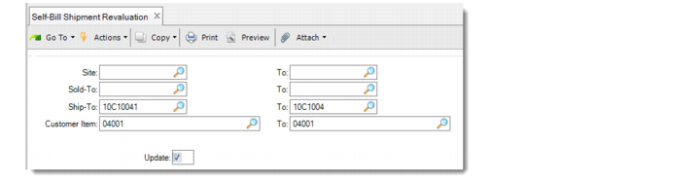
After you change the item net price in Shipment Revaluation Price Maint, use Self-Bill Shipment Revaluation to recalculate the shipper price.
Self-Bill Shipment Revaluation
Use the selection criteria to define the range of the shippers to recalculate prices.
Update
Set this field to Yes to change the prices of the selected shippers and view the report. When this field is set to No, the shipper prices are not changed. You can just view the report.
Viewing Shipment Revaluation Report
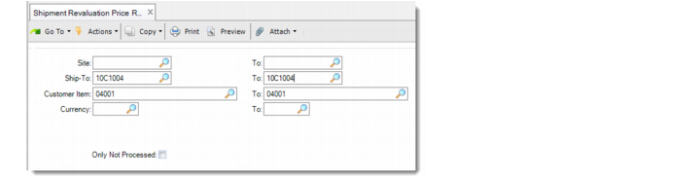
With Shipment Revaluation Price Report, you can view all the revaluation records or only the processed ones.
Shipment Revaluation Price Report
Use the selection criteria to specify the range of the records to display on the reports.
Only Not Processed
Select this option if you want to view only the pending revaluation. When set to No, both the processed and pending revaluation are displayed on the report.