Recording Prepayments with Reconciliation Keys
In functions that allow you to enter prepayments and process them, you can record a reconciliation key, which helps you to search and find tax invoices and prepayments for reconciliation.
The Reconciliation Key field is hidden by default and you must add it using Design Mode. You can add the Reconciliation Key field in Design Mode in the following AP-related programs:
• Supplier Payment Create/Modify/View
• Banking Entry Create/Modify/View
• Supplier Invoice Create/Modify/View
In the following programs, Reconciliation Key is a grid column that you can make visible by right-clicking on the grid headers and choosing Columns:
• Open Item Adjustment Create/Modify/View
• Supplier Opening Balance Create/Modify/View
Running the AP Prepayment Tax Reconciliation Report
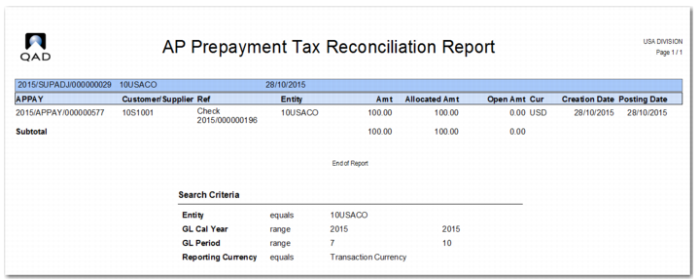
The AP Prepayment Tax Reconciliation report contains output on which you can base your prepayment tax reconciliations. The report lists all transactions that meet the other search criteria. The data is grouped by daybook for each open item adjustment.
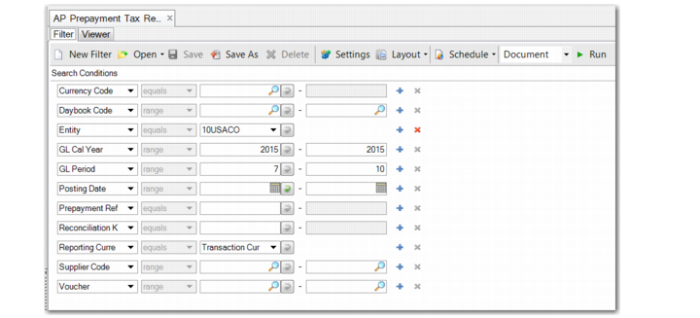
AP Prepayment Tax Reconciliation Report, Criteria
The search criteria are:
Currency Code
Specify the currency code or which you want to run the report.
Daybook Code
Specify the daybook code or range of daybook codes for which you want to run the report.
Entity
Choose the entity for which you want to run the report. The Entity field is mandatory.
GL Cal Year
Specify the GL calendar year or range of years for which you want to run the report. The GL Cal Year field is mandatory.
GL Period
Specify the GL period or range of GL periods for which you want to run the report. The GL Period field is mandatory.
Posting Date
Specify the posting date or range of posting dates for which you want to run the report.
Prepayment Ref
Specify the prepayment reference for which you want to run the report.
Reconciliation Key
Specify the reconciliation key for which you want to run the report.
Reporting Currency
Choose the currency in which to print the report output. The options are Base Currency, Statutory Currency, and Transaction Currency.
Supplier Code
Specify the supplier code or range of supplier codes for which you want to run the report.
Voucher
Specify the invoice voucher number or range of voucher numbers for which you want to run the report.
AP Prepayment Tax Reconciliation Report