Payments Tab
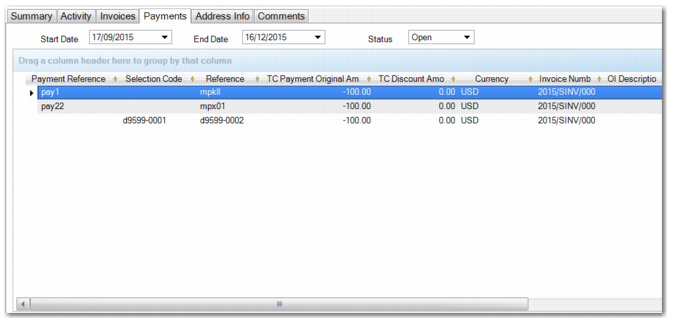
Use the Payments tab to view the payments and payment selections sent to this supplier for a specified date range. Double-click a line on the grid to view the original payment.
Supplier prepayments created using Banking Entry display as payments in the Supplier Activity Dashboard.
Supplier Activity Dashboard, Payments Tab
Field Descriptions
Payment Reference
This field displays the reference for the payment, typically the supplier’s invoice number.
Selection Code
This field displays the payment selection code.
Reference
This field displays the reference text entered on the original payment.
TC Payment Original Amount
This field displays the original amount of the payment.
TC Discount Amount
This field displays the transaction currency discount amount.
Currency
This field displays the currency of the payment.
Invoice Number
This field displays the number of the invoice.
OI Description
If the invoice was adjusted using open item adjustment, this field displays the description recorded in Open Item Adjustment Create (25.13.5) or Open Item Adjustment Modify (25.13.3).
See
Open Item Adjustment for more information.
Status
This field displays the status associated with the payment.
Pay No
This field displays the number of the payment, which consists of a concatenation of the payment year/payment instrument/payment number.
Preprinted Number
This field displays the preprinted number associated with the payment.
Base Currency
This field displays the base currency of the domain in which the payment was created.
Statutory Currency
This field displays the statutory currency of the payment.
Note: You can also add other columns to the grid that are not displayed by default. Hidden columns include Creation Date, Due Date, and Bank Import Reference.
Address Info Tab
The Address Info tab displays the address and contact details of the supplier.
Comments Tab
The Comments tab displays comments recorded for this supplier in the supplier record.
Bills Tab
The Bills tab is only displayed when the supplier is paid through a billing schedule, where multiple invoices are combined into one bill. This tab displays information about bill dates and due dates, along with other relevant information such as the currency and status of the bill.