QAD 2017 Enterprise Edition
>
User Guides
>
Financials
>
Accounts Receivable
>
AR Prepayment Tax Reconciliation
AR Prepayment Tax Reconciliation
In some countries, you must declare tax on a prepayment. This practice is common in Eastern European countries. For example, if you receive a prepayment from a customer and do not ship goods or provide services within a certain time period, you must issue a tax invoice.
The AR Prepayment Tax Reconciliation process lets you add reconciliation key identifiers to link prepayments, tax invoices, and final invoices, and then perform reconciliations for audit purposes.
AR Process for Prepayment Tax Reconciliation
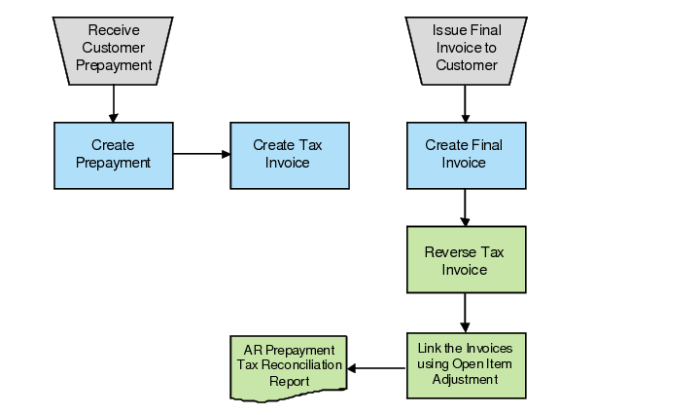
In the AR Prepayment Tax Reconciliation process, you receive customer prepayments and record them in the system using reconciliation keys to identify them. If the tax on the prepayments must be declared, you create a tax invoice for the prepayment tax amount and assign the same reconciliation key. Before you issue the final invoice to the customer, you can record multiple prepayments and multiple corresponding tax invoices.
When your company ships goods or provides services, you send the final invoice to the customer. At this time, you create the final invoice in QAD EE with an identifying reconciliation key. You must then reverse the tax invoice that you created previously, run Open Item Adjustment Create to link the prepayment, final invoice, tax invoice, and tax invoice reversal so that QAD EE can track the whole process using one adjustment record.