Creating Credit Terms
Use the Credit Terms activities (36.1.10) to create, view, modify, or delete a credit terms code. Only credit terms that are not referred to elsewhere in the system can be deleted.
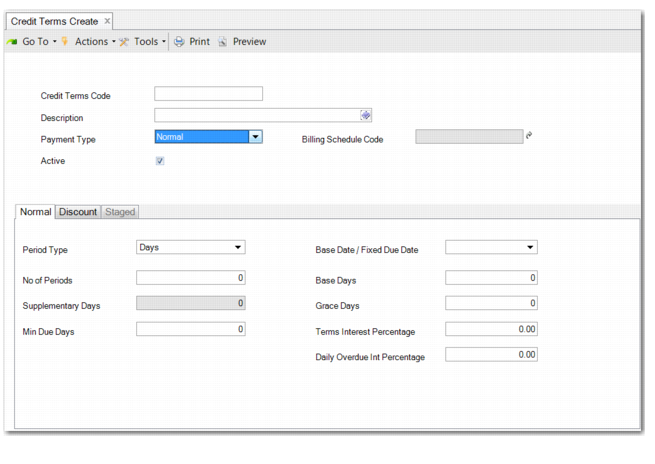
Credit Terms Create
Field Descriptions
Credit Terms Code
Specify a code (maximum of eight characters) that identifies this credit term. You cannot modify existing credit term codes. This field is mandatory; the code cannot be blank.
Description
Enter a brief description (maximum 40 characters) of the credit term. This field is mandatory; the description cannot be blank.
You can optionally enter descriptions in more than one language. For more information on the Translation Option, see
Introduction to QAD Enterprise Applications User Guide.
Payment Type
Select the type of payment: Normal, Scheduled, or Staged.
The payment type determines which tabs can be used to configure the credit terms code. Normal and Discount are used with normal payment types; Staged is used with the Staged payment type. When you select the Scheduled payment type, the tabs are disabled and the Billing Schedule Code field becomes mandatory.
Active
Indicate if this is an active record.
Billing Schedule Code
This field is only active when the Payment Type field is set to Scheduled, and it is then also mandatory. Enter a billing schedule code or use the lookup to select a code for use in due date calculations. The billing schedule code you enter must already exist and needs to be valid for payment type Scheduled.