Creating Meters
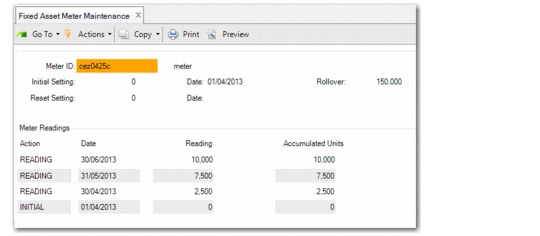
Use Fixed Asset Meter Maintenance (32.11) to create, modify, and delete meters, and enter meter readings. You can also view any assets and fixed‑asset books that use the meter.
Meters measure asset usage for the units‑of‑production depreciation method. You can attach a meter to an asset or group of assets to collect the usage in Fixed Asset Maintenance.
For example, a punch press machine costs $5000 and the meter records that the machine produced 10,000 units for the period. The punch press is expected to produce 1,000,000 units during its service life. The depreciation per period calculation is:
Depreciation Per Period = (10,000 Units / 1,000,000 Units) * $5,000 = $50
Fixed Asset Meter Maintenance (32.11)
Meter
Enter a code (maximum 12 characters) identifying a meter.
Description
Enter a brief description (maximum 30 characters) for this fixed asset meter.
Rollover
Enter the number after which the meter should reset to zero. For example, if a meter can read a maximum number of 1000, enter 1000. When the meter reaches 1001, it begins again at zero.
Initial Setting
Enter the beginning meter number. The default is 0.
Date
Enter the initial date of the meter setting.
Reset Setting
Enter the initial setting for the new meter. You can use this field if you need to replace the meter. The reset setting represents the previous ending meter number.
Date
Enter the date of the reset setting. This date must be after the initial setting date.
Choose the Detail function to enter meter readings.
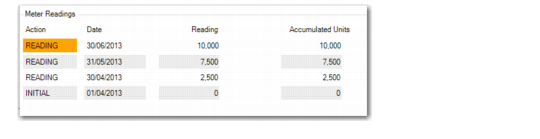
Fixed Asset Meter Maintenance, Meter Readings
Action
The following are system‑assigned actions:
INITIAL: Displays the initial meter setup number.
READING: Displays meter readings.
RESET: Displays the meter reset number.
Date
Enter the date for the meter reading. This date must be later than the previous reading date.
Reading
Enter the meter reading. You can delete only the most recent meter reading.
Accumulated Units
The system displays the total number of units since the meter was created.
Choose the Assets function to view assets and books that use the meter.