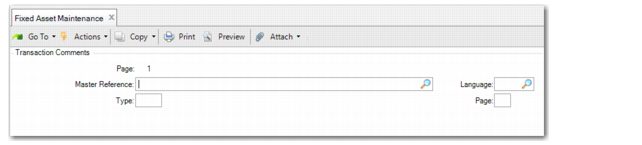
Transaction Comments
Access this function by choosing Cmmts on the Option screen.
Use this function to enter comments about the asset.
Fixed Asset Maintenance, Transaction Comments
Master Reference
To copy master comments, enter the reference code identifying the master comment. Reference codes identify a master comment, usually identifying the topic of the comment, perhaps by the item number or address code to which the comment text applies. Leave blank to enter your own comments.
Type
Enter the type code for this comment. Type codes group similar comments.
Type code can identify the source or use of the comment. Type can be left blank. This field is validated against codes set up in Generalized Codes Maintenance for field cd_type.
Language
Enter a valid, active language code for this master comment. Language codes identify the comment text language. Define language codes in Language Create (36.4.1.1). Leave blank if you are not using multiple languages.
Page
Enter the page number for this master comment. Multiple pages of text can be stored for any comment. Each page is identified and accessed by page number.
Comments
Enter the comments. Multiple pages of text can be stored for any transaction comment. Pages are identified and accessed by page number. Each page number of transaction comments can be copied from a different master comment by specifying an existing master comment reference, type, language, and page. Transaction comment text can also be entered manually with up to 15 lines of text per page.