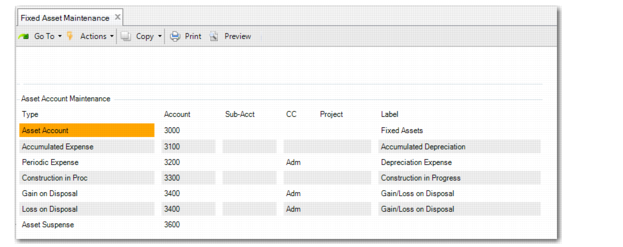
Asset Account Maintenance
Use Asset Account Maintenance to change the accounts, sub‑accounts, and cost centers that defaulted from the asset book, class, and location. You can also add an optional project code. For more information on accounts, see
QAD Financials User Guide.
Access this function by choosing Accts on the Depreciation Books screen. You have to choose the Books function first to maintain the account numbers for the selected book of the fixed asset. The screen to maintain the asset account numbers can only be accessed for a posting book. No accounts can be entered for a non-posting book. When the book is not a posting book and the Accts option is selected, an error occurs.
The account, sub‑account, cost center, and project combination must be valid.
Fixed Asset Maintenance, Asset Account Maintenance
Account
For each type of FA account, enter a valid, active GL account code that records transactions for this fixed‑asset book. Define accounts in Account Create (25.3.13.1). Fixed‑asset accounts default from class-book combination defined in Class Maintenance.
The same restrictions on account types apply here that applied in Class Maintenance. See
Fixed-Asset Accounts for a list of accounts and GL types that you specify here.
Sub‑Acct
Optionally enter a valid, active sub‑account code that records transactions for this fixed‑asset book. Define sub‑accounts in Sub‑Account Create (25.3.17.1). Fixed‑asset sub‑accounts default from Location Maintenance.
CC
Optionally enter a cost center code that records transactions for this fixed‑asset book. Define cost centers in Cost Center Create (25.3.20.1). Fixed‑asset cost centers default from Location Maintenance.
Project
Optionally enter a valid, active project code that records transactions for this fixed‑asset book. Define project codes in Project Create (25.3.11.1.1).