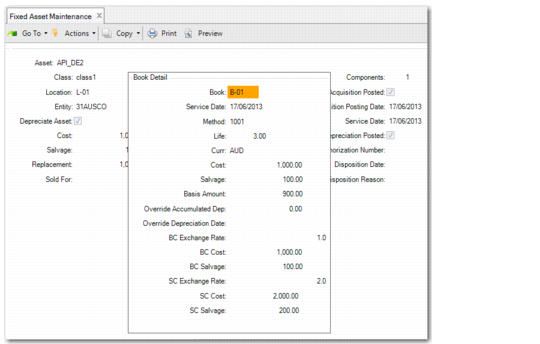
Book Detail
Access this function by choosing Detail on the Depreciation Books screen.
Use this function to view book detail and optionally override accumulated depreciation.
You might need to override accumulated depreciation if you convert from another fixed‑assets system. Enter the date that the new fixed‑assets system begins calculating depreciation in the Override Depreciation Date field. Enter the amount of depreciation previously taken in the Override Accumulated Dep field. If at the end of the asset life there was any difference in the total depreciation and the actual amount that was taken, it is added to the final period depreciation amount.
Important: If a fixed asset has been acquired (acquisition posted), the fields in the Book Detail screen are no longer editable.
Fixed Asset Maintenance, Book Detail
Curr
Displays the currency for the book, which is defined in Book Maintenance.
Cost
Displays the fixed asset cost in the transaction currency.
You can update this value if the fixed asset has not been posted.
If you modify the Cost field, the BC Cost and SC Cost fields are automatically updated.
Salvage
Displays the salvage amount in the transaction currency.
You can update this value if the fixed asset has not been posted.
If you modify the Salvage field, the BC Salvage and SC Salvage fields are automatically updated.
If the fixed asset is depreciated, you can only update the salvage value using a depreciation adjustment type of Salvage. See
Depreciation Adjustment.
Override Accumulated Dep
Enter the amount of depreciation that was taken between the service date and the override depreciation date. You can update this amount only if the asset has not been posted to the GL.
Override Depreciation Date
Enter the date that the override depreciation calculation begins. You can update this date only if the asset has not been posted to the GL.
BC Exchange Rate
Displays the exchange rate from the transaction currency to the base currency. The exchange rate used is the Accounting exchange rate valid on the date specified in the Acquisition Effective Date field.
You can update the exchange rate if the transaction currency and base currency are different. You cannot update the exchange rate if the fixed asset has been posted.
BC Cost
Displays the fixed asset cost in the base currency. If you modify the Cost field, the BC Cost field is automatically updated.
BC Salvage
Displays the salvage amount in the base currency. If you modify the Salvage field, the BC Salvage field is automatically updated.
If the fixed asset is depreciated, you can only update the salvage value using a depreciation adjustment type of Salvage. See
Depreciation Adjustment.
SC Exchange Rate
Displays the exchange rate from the transaction currency to the statutory currency. The exchange rate used is the Statutory exchange rate valid on the date specified in the Acquisition Effective Date field.
In domains where the statutory currency is not enabled, the SC Exchange Rate field is read only and displays the transaction currency to base currency exchange rate.
You can update the exchange rate if the statutory currency is enabled, and if the transaction currency and statutory currency are different. You cannot update the exchange rate if the fixed asset has been posted.
If no Statutory exchange rate is available for the effective date and Fallback to Accounting is selected for the Statutory exchange rate type, the system uses the Accounting exchange rate for the transaction currency to statutory currency conversion.
SC Cost
Displays the fixed asset cost in the statutory currency. If you modify the Cost field, the SC Cost field is automatically updated.
In domains where the statutory currency is not enabled, the SC Cost field is read only and displays the base currency cost.
SC Salvage
Displays the salvage amount in the statutory currency. If you modify the Salvage field, the SC Salvage field is automatically updated.
If the fixed asset is depreciated, you can only update the salvage value using a depreciation adjustment type of Salvage. See
Depreciation Adjustment.
In domains where the statutory currency is not enabled, the SC Salvage field is read only and displays the base currency salvage amount.