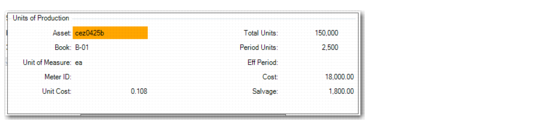
Units of Production and Depreciation Schedule
Access this function by choosing UOP on the Depreciation Books screen.
Note: The Fixed Asset Maintenance screen can only run in Terminal mode for assets using this method of depreciation.
If you are using the UOP depreciation method, use this function to update the total and estimated units of production. You also track the actual period of production.
Fixed Asset Maintenance, Units of Production
Unit of Measure
Enter the unit of measure for this asset; for example, inch or foot.
Meter ID
Enter a predefined meter ID. Meters are used to measure asset usage for the units‑of‑production depreciation method. You can attach a meter to an asset or group of assets to collect the usage in Fixed Asset Maintenance.
Total Units
Enter the estimated total number of units that this asset is expected to produce during its service life.
Eff Period
Enter the effective period that you want to use to adjust the total and estimated units of production. The format is YYYYXX, where YYYY is the year and XX is the period.
Important: If you modify this number, all unposted periods are automatically adjusted.
Period Units
Enter the estimated number of units that this asset is expected to produce each period. This amount must be less than the total units.
Cost
Enter the cost to acquire this asset. This amount cannot be less than the amount of depreciation already taken for this asset.
Choose the Actual function to track the actual period of production.
Fixed Asset Maintenance, Depreciation Schedule
Yr-Per
Enter the year and the period for the actual period of production.
The format is YYYYXX, where YYYY is the year and XX is the period.
Actual Period Production
Enter the actual number of units that this asset produced this period. This number must be less than the remaining units for the asset.