Split
Access this function by choosing Split on the Asset Component Maintenance screen.
Use this function to divide an asset into two separate assets. This is referred to as splitting. Splitting is used to divide an asset containing a group of individual items into two separate assets. Splitting is also used for partial retirements and transfers.
Enter a unique asset ID for the components being removed from the asset. If Auto Generate Asset is Yes in Fixed Asset Control, the system automatically assigns an asset ID using the predefined Number Range Management sequence.
The new asset is created containing the separate items and the appropriate percentage of the original asset cost, salvage, depreciation, and depreciation adjustments. The Split From and Split Date fields on the Option screen are updated to reflect the source asset and the date of creation.
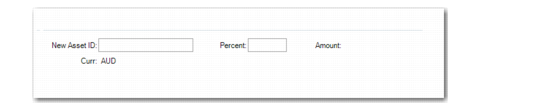
Fixed Asset Maintenance, Split
New Asset ID
Enter a unique asset ID for the components being removed from the asset. If Auto Generate Asset is Yes in Fixed Asset Control, the system automatically assigns an asset ID using the predefined Number Range Management sequence.
Percent
If the asset has only one component, enter the percentage of the original asset cost to assign to the new asset. You can also enter a currency amount in Amount.
Amount
If the asset has only one component, enter the base currency amount to assign to the new asset. You can also enter a percentage of the original cost in Percent.
Curr
Displays the book currency as defined in Book Maintenance. This field is read only.