Fixed Asset Batch Maintenance
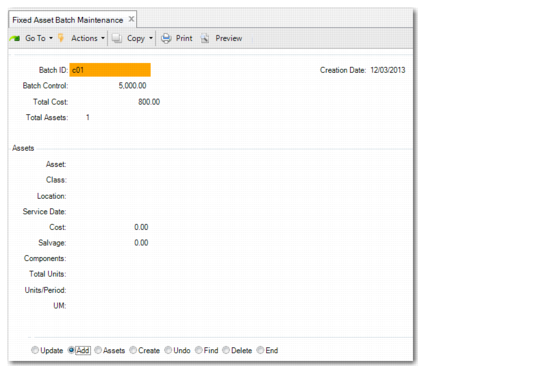
Use Fixed Asset Batch Maintenance (32.7) to group similar fixed assets together in a batch and add them to the system as individual asset records. Batch processing lets you group up to 25 fixed assets and add them to the system as individual asset records.
When you create assets, you can optionally post GL transactions related to acquisition costs. Whether you post to GL is determined by how you manage such costs. For example, if you account for the acquisition cost during purchase order receipt, you can enter No in Post to GL to avoid double-booking of the cost. This feature is described in more detail in
Acquisition Costs.
Note: Fixed‑asset batches have no relation or similarity to batches used in other financial modules.
After the assets are created, you can modify them individually in Fixed Asset Maintenance.
To allow for CIM processing, Fixed Asset Batch Maintenance does not use the standard buttons found in other fixed-asset functions. You can use the CIM-load functions to load fixed-asset data into the system. See
here for details.
Fixed Asset Batch Maintenance (32.7)
Batch
Enter a unique batch ID or click Next to have the system assign a batch ID. System‑generated batch IDs are in the format YYMMDDNN. YY is the year, MM is the month, DD is the day, and NN is the next batch number for the day.
Batch Control
Enter a control amount for this batch. The control amount is the total value for all the assets in the batch. Use the control amount to set a minimum or maximum amount allowed for the batch.
Choose the Assets function to add assets to the batch.
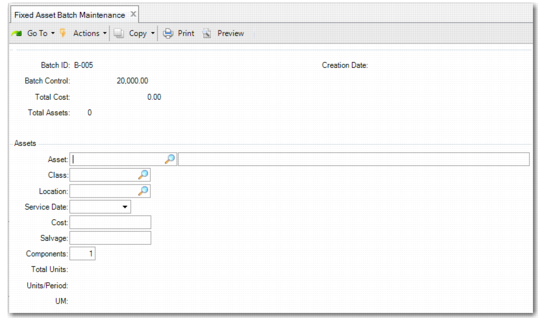
Fixed Asset Batch Maintenance, Assets
Asset
Enter a unique ID of up to 12 characters identifying a fixed asset that is part of the batch.
If Auto Generate Asset is Yes in Fixed Asset Control, this field cannot be updated. Asset IDs are automatically assigned.
Asset Description
Enter up to 30 characters describing the fixed asset. This description is for reference only and displays on various reports and inquiries.
Class
Enter a predefined class ID. Define class IDs in Class Maintenance. The class determines the default account codes for the asset.
Location
Enter a predefined location ID. Define location IDs in Location Maintenance.
Fixed‑asset location codes refer to the accounting location of the fixed asset. This location is not necessarily the physical location of the fixed asset.
Service Date
Enter the date that this fixed asset was put into service. The service date is the default date used to calculate depreciation.
This date must be in an open GL calendar period and must exist in any fixed‑asset calendars associated with default books in the class.
Cost
Enter the amount paid to acquire the asset.
This cost is used to calculate the basis amount for each default book created for the asset.
Salvage
Enter an optional salvage value for this asset.
Salvage value is the estimated value of property at the end of its useful life. It is the amount reasonably expected in an open market for the asset after it is no longer productive. If a salvage value is defined at the beginning of the depreciation calculation, it is used to reduce the depreciable basis.
Components
Enter the number of components that belong to this asset ID. If you are updating an asset, the new value cannot be less than the original value entered.
For example, if an asset is acquired that consists of 200 chairs, the chairs can be grouped together as one asset. In this case, you set components to 200.
You cannot enter a value less than 1.
Total Units
If you are using the units‑of‑production depreciation method, enter the estimated total number of units that this asset is expected to produce during its service life.
Units/Period
If you are using the units‑of‑production depreciation method, enter the estimated number of units that this asset is expected to produce each period.
UM
If you are using the units‑of‑production depreciation method, enter the unit of measure for this asset; for example, inch or foot.