Part 2: Correcting Statutory Currency GL Balances
The second part of the conversion involves the correction of statutory currency balances on fixed asset-related GL accounts. You must perform the conversion by domain. If the statutory currency and the base currency are the same for a domain, you do not need to perform this step for the domain. The conversion program checks whether the data in the system satisfies the checklist. If not, the errors are recorded in a log file.
Prerequisite Conversions Checklist
To run the conversion successfully, check the following conditions before you start the conversion:
• All the fixed assets in the domain that have started depreciation but are not retired must have been depreciated to the same period.
• The system posts the delta transactions on the end date of the last period of the depreciation transaction in the domain. The acquisition posting period cannot be later than the last depreciation period in the domain. Otherwise, the correction posting is earlier than the acquisition date.
• All unposted transactions in the Fixed Assets module (of the type FA) must be posted to Financials using Operation Transaction Post. Otherwise, unposted transactions are not included in the statutory currency balance correction process because they are not recorded in GL transactions.
Conversion Steps
To complete the correction:
1 Export the fixed asset codes and related accounts to a .csv file.
Run Fixed Asset SC Rates Export to export the list of the fixed asset codes, the fixed asset-related GL accounts, and corresponding currency codes to a .csv file. You can specify the name of the file and where to store it.
2 Specify the correct statutory exchange rates for all the fixed asset books.
3 Import the .csv file and assign the statutory exchange rates for the fixed assets
Run Fixed Asset SC Rates Import to retrieve the rates defined in a .csv file and assign them to the corresponding books of the fixed assets.
4 Correct the statutory values on the fixed assets accounts.
Fixed Asset SC Rates Export
Run Fixed Asset SC Rates Export (36.25.94) to export the list of the fixed asset codes, the fixed asset-related GL accounts, and corresponding currency codes to a .csv file.
In the .csv file, the Fixed Asset column lists the fixed assets in the domain. The From Currency column lists the related book currencies of the fixed asset.
Editing the Exported .csv File
In the second part of the conversion, a .csv file is used to specify the correct statutory exchange rates for the fixed assets. Generate the .csv file using Fixed Asset SC Rates Export. After exporting, the output .csv file has the following format:
|
By Fixed Asset:
|
Fixed Asset
|
From Currency
|
SC Exchange Rate
|
|
|
FA-01
|
USD
|
|
|
|
FA-02
|
USD
|
|
|
|
FA-03
|
USD
|
|
|
|
FA-04
|
USD
|
|
|
By Account:
|
Fixed Asset Account
|
From Currency
|
SC Exchange Rate
|
|
|
3000
|
USD
|
|
|
|
3010
|
USD
|
|
The From Currency column lists the domain base currency. Update the SC Exchange Rate column when converting a prior version of Fixed Assets to statutory currency.
You can use one of three possible approaches to specifying the exchanges rates: GL level, asset level, and mixed level.
• GL level
If a rate is specified for a fixed asset account in the .csv file, the rate is assigned to the books in the fixed asset with the same linked fixed asset account.
• Asset level
If a rate is specified for a fixed asset code in the .csv file, the rate is assigned for all books for this fixed asset.
• Mixed
If you specify the rates for both fixed asset codes and fixed asset accounts, the rate in the fixed asset level precedes the rate in the account level.
You can choose the level at which to assign the SC rates according to the business case. Use asset level only for cases where you want to use that level of detail and the data is available for it.
Example: A Construction In Process (CIP) account comprises several invoices and journals in different currencies with different exchange rates before the fixed asset is capitalized. In this case, it is common that the value of the statutory currency amount divided by the base currency amount on the CIP account is the historical statutory exchange rate applied for this particular fixed asset.
For the large assets, you may want to specify the rate per asset. For the smaller assets, GL level is generally enough. Usually, the rate for the fixed asset GL is assigned with the statutory rate at the year opening.
Fixed Asset SC Rates Import
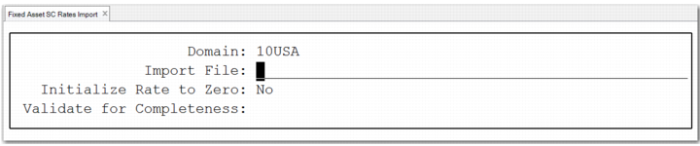
For converted fixed assets, you can use Fixed Asset SC Rates Import (36.25.94) to import the statutory exchange rate from a .csv file when the statutory currency is not the same as the base currency.
Fixed Asset SC Rates Import validates the layout of the .csv file.
Important: Ensure that the layout of the imported .csv file matches the layout of the exported one. Do not modify the header lines of By Fixed Asset and By Account. Each imported .csv file must contain these two sections. If you only use one of them to specify the statutory currency rate, you still need to keep the other header lines of both in the file.
Fixed Asset SC Rates Import
Domain
Specify the domain to which you want to import statutory currency exchange rates for fixed assets.
Import File
Specify the name of the .csv file that contains the statutory currency exchange rates to import.
Initialize Rate to Zero
Set this field to Yes if you want to initialize all the fixed asset statutory currency rates in the system to 0 and then update them with the rates in the .csv file.
Validate for Completeness
Set this field to Yes when Fixed Asset SC Rates Import must check that all books for all fixed assets are assigned a statutory exchange rate using asset or GL level methods.
The system uses the statutory exchange rate per book to correct the statutory amounts on the fixed asset related accounts. Fixed Asset SC Rates Import detects any missing statutory exchange rates and reports an error. The rates assignments are not saved in this case.
If you set this field to No, Fixed Asset SC Rates Import detects any missing statutory exchange rates and reports a warning. The rate assignments are saved so that you can import the remaining rates later.
Fixed Asset SC Conversion
In earlier versions of the Fixed Assets module, the statutory currency balances on the fixed assets related accounts use the table rate on the posting date. The correct rate is the set of historical values at the capitalization of the fixed asset. The system must calculate two types of delta values to correct the statutory currency balances: the delta amount on the acquisition cost and the delta amount on the depreciation.
Use Fixed Asset SC Conversion to calculate the delta amounts and correct the statutory currency balances. The system checks whether it is necessary to run the menu. If it is necessary, you must run Fixed Asset SC Conversion. Otherwise, the fixed asset menus are blocked. Normally, when performing a conversion where statutory currency is applied in your system or you are updating the statutory currency setting using the Statutory-Currency Utility, it is mandatory to run the statutory conversion for fixed assets. You can look at the log file to see the detailed information during the correction process; for example, about the delta amount calculated, the details of the correction transactions, and the kinds of errors generated.
Example: A fixed asset was capitalized in December 2012 and the cost value was 1500 in base currency, which was equal to 2900 in statutory currency at that time. For each period, the fixed asset depreciated by 100 in base currency. In statutory currency, the system posted the value according to the table rate on the posting date. The rates were 190, 195, 205, 205, and 210 respectively.
In May 2013, the company plans to convert the Fixed Assets module to use multiple currencies. At this time, the correct statutory exchange rate is 2 for the fixed asset at capitalization and a historical rate of 2 must be applied in the whole life of this fixed asset. Therefore, the correct asset depreciation amounts in statutory currency are 200 for each period.
After calculating, there are two delta amounts: one is the difference on the fixed asset cost, which is 10 (3000 – 2900) and the other is the difference on the depreciation, which is -5. The system calculates the differences and posts them to correct the balance on the statutory currency as the following:
| 2012 | 2013 |
| 12 | 1 | 2 | 3 | 4 | 5 | 6 | 7 | 8 |
Book Value | 1500 | -100 | -100 | -100 | -100 | -100 | -100 | -100 | -100 |
SC Value (Old Rate) | 2900 | -190 | -195 | -205 | -205 | -210 | | | |
SC Value (Correct Rate) | 3000 | -200 | -200 | -200 | -200 | -200 | -200 | -200 | -200 |