Setting Up Control Parameters
Use Fixed Asset Control (32.24) to specify:
• If asset IDs are generated by the system or assigned manually
• If the system creates summary or detailed journal entries for fixed‑asset GL transactions
• Whether the differences between the primary and secondary books are posted to the GL or the full amounts of the secondary posting books are posted to the GL
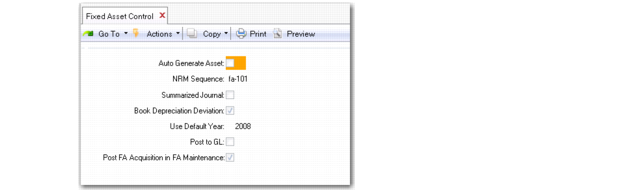
Fixed Asset Control (32.24)
Auto Generate Asset
If Yes, the system assigns unique asset IDs, using the Number Range Management (NRM) sequence for assets entered in Fixed Asset Maintenance and Fixed Asset Batch Maintenance. NRM is used to generate, control, and audit sequence numbers. Users cannot specify them manually. For more information on NRM, see
QAD System Administration User Guide.
NRM Sequence
If Auto Generate Asset is Yes, enter the predefined NRM Sequence ID set up for the target dataset of fa_id.
Use Number Range Maintenance (36.2.21.1) and Sequence Number Maintenance (36.2.21.5) to define the NRM Sequence ID. The sequence must be 12 characters or less.
Summarized Journal
If Yes, Fixed Asset Transaction Post (32.13) creates transactions by account, sub‑account, cost center, and project combination.
When you first implement Fixed Assets, consider creating detailed journal entries. You can verify that each transaction is being processed with the right account numbers and then correct any mistakes. After you verify that the entries are correct, you can switch to a summarized journal, which takes less space and is easier to handle in the GL.
Book Depreciation Deviation
If Yes, the differences between the primary and secondary books are posted to the GL. If No, the full amounts of the secondary posting books are posted to the GL.
Note: You can set book depreciation deviation at book level and system level. The value in system level (set in Fixed Asset Control) becomes the default value at book level. The value set at book level can then overwrite the default value.
FA Post to GL
Specify a default value for the Post to GL field in Fixed Asset Maintenance (32.3). You can update the default in Fixed Asset Maintenance.
The Post to GL frame ensures that you can easily post a transaction to the GL whenever you maintain a fixed asset using Fixed Asset Maintenance. However, once you set the Post to GL field to Yes and generate a GL transaction, the system no longer displays the Post to GL frame when you subsequently access Fixed Asset Maintenance to maintain the fixed asset. This option prevents you from accidentally posting the fixed asset GL transaction twice.
Note: This setting also applies to fixed assets created in Fixed Asset Batch Maintenance (32.7) and subsequently maintained in Fixed Asset Maintenance.
Post FA Acquisition in FA Maintenance
There are two options for posting fixed asset acquisitions: using Journal Entry Create (25.13.1.1) or using Fixed Asset Maintenance.
Set this field to Yes if you want to ensure that fixed asset acquisitions are always posted using Fixed Asset Maintenance. If you specify Yes, the Post to GL frame always displays in Fixed Asset Maintenance until you post fixed asset acquisitions. If this field is set to No, the Post to GL frame does not display in Fixed Asset Maintenance, and you can use Journal Entry Create (25.13.1.1) to post the acquisition.