QAD 2017 Enterprise Edition
>
User Guides
>
Global Tax Management
>
Implementing GTM
>
Setting Up Trailer Charges
Setting Up Trailer Charges
Sales transactions often have additional charges such as freight, service, and labor that are independent of individual line items. These known as trailer charges because they appear at the end of the transaction.
Each trailer charge has a default taxable status and an optional default tax class. This information is defined in the trailer code record. However, in GTM, you can also set up trailer charge detail records to support exception conditions when a trailer charge has a different taxable status and/or tax rate for some tax types and customer tax classes.
Example: If service charges are normally exempt from California sales tax but professional services are taxable at 5%, you can set this up in at least two ways.
• If you defined tax types for tax exemptions, define a taxable trailer code. Set up a taxable trailer tax detail for the tax type/tax class combination. Finally, set up a 0% tax rate for exempt trailer charges and a 5% rate for the professional services class.
• If you plan to report all exempt amounts under tax type NON-TAX, define a non-taxable trailer code. Set up a taxable trailer tax detail for the tax type/tax class combination. Finally, set up a 5% tax rate for the professional services class. You do not need a 0% tax rate because this is supplied by default.
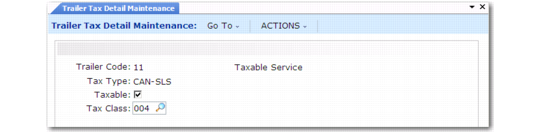
If you have not already implemented trailer code records, do so in Trailer Code Maintenance (2.19.13). Then, identify the exception conditions and set up the corresponding records in Trailer Tax Detail Maintenance (29.1.21). To verify data setup, use Trailer Code Browse (2.19.14) for trailer codes and the Trailer Tax Detail Inquiry (29.1.22) and Report (29.1.23) for trailer tax details.
Trailer Tax Detail Maintenance (29.1.21)
Trailer Code
Enter a trailer code previously set up in Trailer Code Maintenance (2.19.13). You can set up trailer tax details for a maximum of 99 trailer codes. However, you can set up an unlimited number of trailer tax details per trailer code.
Tax Type
Specify the tax type subject to special treatment for this trailer charge.
Taxable
Specify whether amounts for this trailer code are taxable for the tax type/tax class combination.
Tax Class
If applicable, enter the tax class subject to special treatment for this trailer charge.