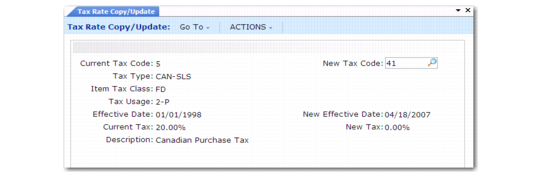
Tax Rate Copy/Update
To streamline the task of entering tax rates, group the required rates for a tax type/item tax class/tax usage/effective date combination. Set up a generic rate first, then copy with Tax Rate Copy/Update (29.4.5) and customize it as necessary.
Tax Rate Copy/Update (29.4.5)
Current Tax Code
Enter the tax code of the tax rate to copy. The tax type, item tax class, tax usage, current effective date, current tax rate percentage display for the selected rate.
New Tax Code
Leave blank for the system to assign the next available tax code, incremented from the Last Tax Code value in Global Tax Management Control (29.24). Alternately, enter a previously unassigned value.
New Effective Date
Specify the starting date for using the new tax rate in tax calculations. If you do not specify a date, the system inserts the record creation date. When you enter multiple tax rates, the default effective date is the one in the last record entered.
New Tax
Enter the percentage for the new tax rate.
Tax Rate Copy/Update redisplays information from the source tax rate and allows you to customize settings.