Setting Up Golden Tax
In order for the Golden Tax invoice process to run properly, you need to set up some prerequisite data and initialize settings in Golden Tax Invoice Control (7.13.20.1.24).
Define Golden Tax Prerequisites
• Specify the invoice upper limit for your company for special and ordinary invoices in the Entity record (36.1.1.2), so that QAD invoices can be split into several Golden Tax invoices. For more information, see
Upper Limits and Invoice Splitting.
• Specify a default Golden Tax transaction type for each customer in Customer Create.
• Set up the Golden Tax tax rate in Tax Rate Maintenance (29.4.1). The VAT rate in China is typically 17%. This tax rate should be referenced by specifying the tax environment and other tax parameters when you create a sales order.
Set Up Golden Tax Invoice Control
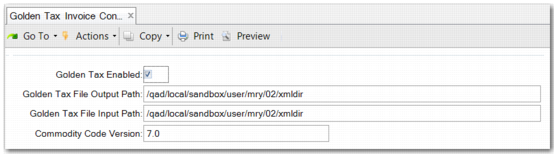
Use Golden Tax Invoice Control (7.13.20.1.24) to enable the tax system and define processing defaults.
Golden Tax Invoice Control (7.13.20.1.24)
Field Descriptions
Golden Tax Enabled
Select to enable Golden Tax features.
Golden Tax Output Path
Specify the file path where the system places the output file to be uploaded to the Golden Tax system for VAT invoice print.
Golden Tax Input Path
Specify the default path of the file you import back into the QAD database containing information about printed invoices generated by the Golden Tax system.
Commodity Code Version
Specify the commodity code version to be included in the XML file.
Own Company Golden Tax ID
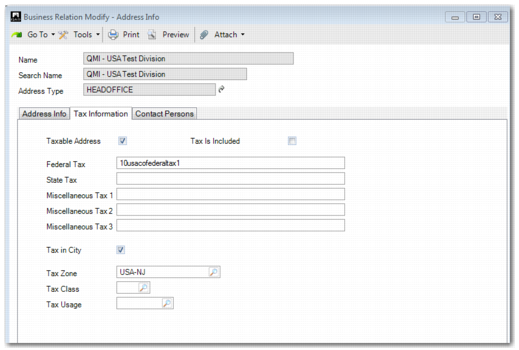
To maintain your company Golden Tax ID, use Business Relation Modify (36.1.4.3.2). You can maintain the value in the Federal Tax field of the HEADOFFICE type address in the record for your own company. If you do not use federal tax, maintain the Golden Tax ID in the State Tax field instead.
Golden Tax ID