Golden Tax File Create
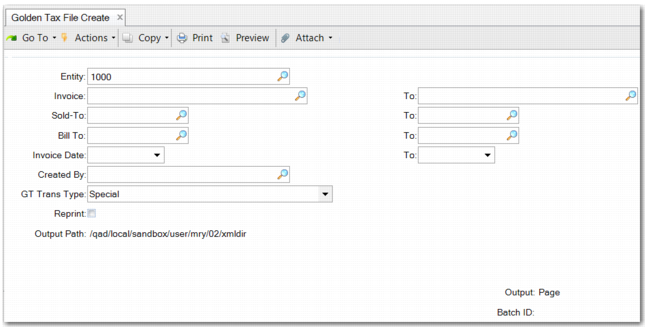
Use Golden Tax File Create (7.13.20.1.2) to select and export QAD invoices into an XML file to be uploaded to the Golden Tax system for VAT invoice print.
The file is generated in a standard XML format so that you can directly import it using the Golden Tax program in the Golden Tax system.
Golden Tax File Create (7.13.20.1.2)
Select the invoices to include in the file to create by specifying the entity, invoice number, sold-to, bill-to, invoice date, and creator. You also specify the GT Trans Type, choosing Special or Ordinary. You must set the correct type for the invoice or invoice group. Any foreign currency invoices are first converted to base currency before splitting logic is applied. Set the output path in Golden Tax Invoice Control (7.13.20.1.24). The file is generated in XML.
In the generated Golden Tax file, the item and item description on the invoices are retrieved by the item code on the sales order in the following sequence:
1 If you maintain the item information in generalized codes, the values in generalized codes is retrieved. If not, go to step 2.
2 If you maintain a customer item for this item, the customer item code and customer item description (Display Customer Item) are retrieved. If the customer item is not maintained, go to step 3.
3 If you maintain the item in Item Maintenance, the item code and description are retrieved from item master data. If the item is not maintained, go to step 4.
4 The item code and description from the corresponding sales order are retrieved.