Printing Golden Tax Invoices
Printing Golden Tax invoices is a non-QAD task that you perform with the Golden Tax system. The system also outputs a data file of printed Golden Tax invoices that you can load back into QAD in Golden Tax File Load (7.13.20.1.3).
Importing a Golden Tax File
Use Golden Tax File Load (7.13.20.1.3) to import back into your QAD database information about printed Golden Tax invoices, such as Golden Tax invoice numbers, so that they can be referenced later.
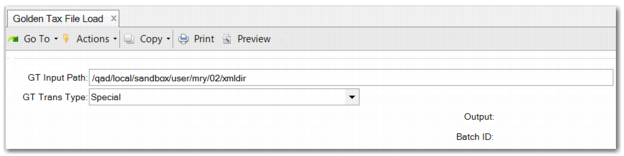
You need to specify the path to the file that contains the printed Golden Tax invoices to import. The import file is automatically generated after the Golden Tax system prints VAT invoices.
Multiple Golden Tax invoices can be associated with one QAD invoice if the invoice is split according to the invoice upper limit. See
Upper Limits and Invoice Splitting for details.
You can query Golden Tax invoices and view their association with QAD invoices in Golden Tax Invoice Report (7.13.20.1.6).
Golden Tax File Load (7.13.20.1.3)
To import the Golden Tax file, specify the path of the file. The path defaults from the appropriate setting in Golden Tax Invoice Control (7.13.20.1.24). The GT Trans Type enables you to specify the transaction type for the invoices contained in this Golden Tax file.