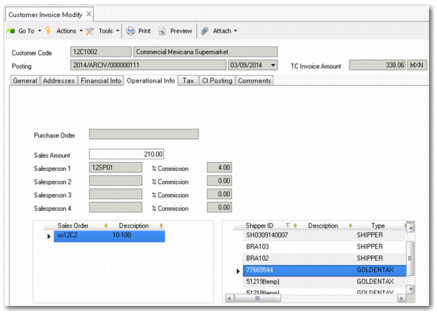
Customer Invoice Modify
In the customer invoice, the system keeps track of the Golden Tax invoice numbers associated with the QAD invoice.
Customer Invoice Modify
After running Invoice Post and Print, temporary Golden Tax invoice numbers are generated and appear in the Shipper ID field on the Operational Info tab of the related Customer invoice. The type is GOLDENTAX. Shipper IDs with type GOLDENTAX are the Golden Tax invoice numbers associated with the ERP invoice.
The Shipper ID is automatically updated with the VAT invoice numbers—the legal Golden Tax invoice number—when you run Golden Tax File Load (7.13.20.1.3). You can also add, modify, or delete the Shipper ID to manually maintain Golden Tax invoice numbers associated with the ERP invoice in Customer Invoice Modify.
To enable you to audit and trace invoice number updates, the system records each update on the Shipper ID, indicating:
• Whether it is an automatic or manual modification
• The user who did the update
• The update date and time