AR Reports for Golden Tax Invoices
Several AR reports display the Golden Tax invoice number.
Customer Invoice Extended View
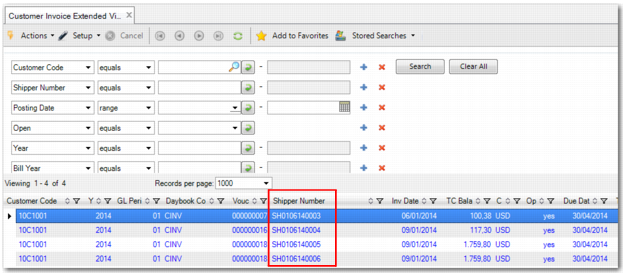
In Customer Invoice Extended View (27.18.4), the Type column and the Shipper Number column allow you to check every shipper number, legal document number, Golden Tax invoice number, or Golden Tax transaction type for an invoice. They are displayed in separate lines.
In the search criteria, you can enter the Golden Tax invoice number in the Shipper field to find the related QAD invoice. You can also use the Shipper field to search for the shipper number or legal document number. If the Golden Tax invoice number has not been loaded back into the QAD system, the temp number is displayed.
Customer Invoice Extended View
Note: Customer Open Item Report (27.17.1) and Customer Open Item Basic Report (27.17.15) can also display the Golden Tax invoice number.
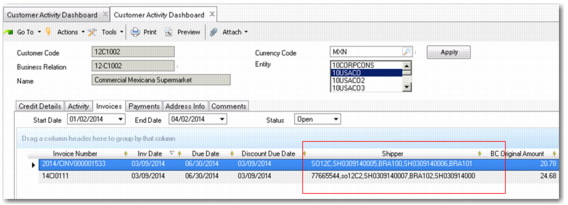
Customer Activity Dashboard
In Customer Activity Dashboard (27.18.1), on the Invoice tab, the Shipper column displays the customer shipper ID, legal document ID, or Golden Tax invoice number. This field is hidden by default. To make it visible, right-click the column and select the Shipper field.
Customer Invoice Extended View
Other AR Reports
The Golden Tax invoice number field is also available in the data set of the following reports:
• Customer Aging Analysis History (27.17.7)
• Reminder Letter (27.17.10)
• Customer Reminder Overview (27.17.11)
• Customer Statement of Account (27.17.19)