Withholding Tax in Views and Dashboards
Supplier Invoice Extended View
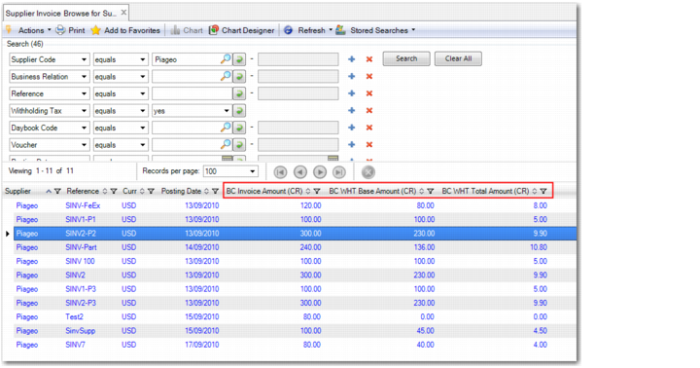
In Supplier Invoice Extended View and Supplier Invoice View, you can use the Withholding Tax filter to only display invoices that are subject to withholding tax. The view displays the taxable base amount that is subject to withholding tax and the withholding tax amount for that invoice.
Supplier Invoice Extended View
Supplier Activity Dashboard
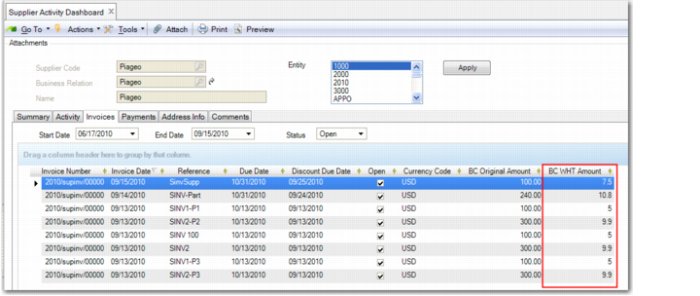
The Activity, Invoices, and Payments tabs of the Supplier Activity Dashboard show withholding tax totals for invoices and payments.
Supplier Activity Dashboard
Supplier Withholding Tax View
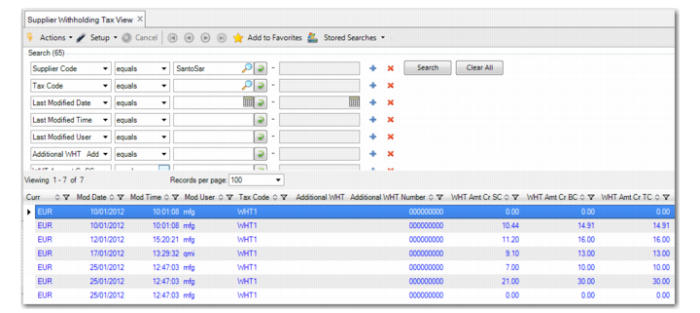
The Supplier WHT View provides a detailed view of all withholding tax records for the current entity. It includes information such as the supplier code, related invoice, status (Initial, Due, Void), amounts, tax information, and payment reference.
Supplier Withholding Tax View