Creating Gross Income Accounting Postings
When posting a sales invoice using Invoice Post and Print (7.13.4), the system creates a gross income accounting posting if the following conditions are met:
• Gross income accounting is enabled for both the order header and line site entities.
• A gross income accounting grouping record for the sales and tax expense accounts is defined for the order header site entity.
• The invoice posting daybook is of type Customer Invoice, Customer Credit Note, Customer Invoice Corrections, or Customer Credit Note Corrections.
• Tax-By-Line is selected for the tax type in Tax Rate Maintenance (29.4.1).
The system also creates gross income accounting postings for sales invoices posted using Pre- Shipper/Shipper Confirm (7.9.5), Pre-Shipper/Shipper Auto Confirm (7.9.7), and Shipper Unconfirm (7.9.21) if the relevant conditions are met.
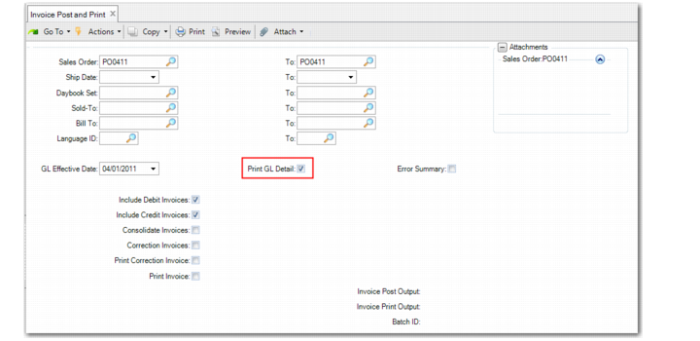
Invoice Post and Print
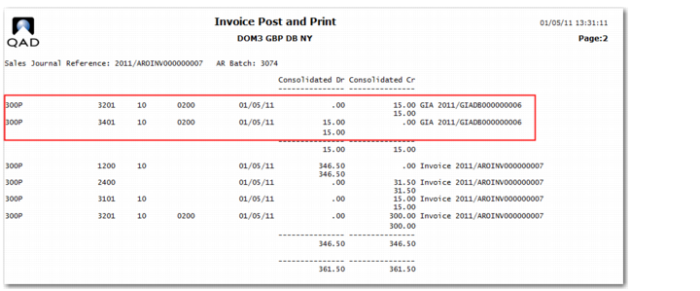
If you select the Print GL Detail field in the Invoice Post and Print selection frame, the GL Detail report includes the gross income accounting posting.
Invoice Post and Print, GL Detail Report
The gross income accounting transaction is posted to the line site entity, this is; the entity where the sales transaction is posted. The posting has the same posting date as the sales, tax, and customer control account postings, and also uses the same exchange rate. If statutory currency is enabled for the domain, the gross income accounting posting is also created in statutory currency. In addition, if corrections are enabled in GL Correction Control (25.13.24), the gross income accounting posting follows the correction rules.
The gross income accounting transaction for a customer invoice:
Debits the tax expense account
Credits the sales account
The gross income accounting transaction for a customer credit note:
Credits the tax expense account
Debits the sales account
Note: Gross income accounting postings are created for sales order trailer charges, if the relevant prerequisites are met.
Other Functions
If the Auto Invoice Post field is selected in Customer Schedules Control (7.3.24), Invoice Post and Print is automatically started from the following customer consignment inventory functions:
• Inventory Usage Create (7.18.13)
• Authorization Usage Create (7.18.14)
• Sequenced Usage Create (7.18.15)
• Shipper Usage Create (7.18.19)
• Usage Create Undo (7.18.22)
• Aging Inventory Update (7.18.10)
For sales orders posted from each of the above functions, gross income accounting postings are created if the relevant prerequisites are met.
The following Service and Support Management functions create pending invoice record used by Invoice Post and Print to create invoices:
• Call Activity Recording (11.1.1.13)
• Call Invoice Recording (11.1.1.15)
• Billing Release to Invoice (11.5.18.13)
• RMA Maintenance (11.7.1.1)
• RMA Receipts (11.7.1.13)
• RMA Shipments (11.7.1.16)
• Retrobill Maintenance (7.13.13.1)
When pending invoices created from each of the above functions are posted, gross income accounting postings are created if the relevant prerequisites are met.
Cross-Company Postings
The system creates a cross-company gross income accounting posting if:
• A gross income accounting mapping is defined in the header site entity.
• Gross income accounting is enabled in both the header and line site entities.
If gross income accounting is enabled for the order header site and this site is used for all orders, additional mappings are not required for other entities. This is also the case if the same site is used for both the sales order header and lines. However, if you implement gross income accounting based on the entity of the sales order line site, then you must enable gross income accounting in all line site entities and ensure that gross income accounting mappings are defined in each entity.