QAD 2017 Enterprise Edition
>
User Guides
>
Global Tax Management
>
AvaTax
>
Configuring GTM Data
Configuring GTM Data
GTM Setup Specific to AvaTax
AvaTax requires the following setup in GTM:
• Configure Generalized Codes Maintenance and Global Tax Management Control.
• Define taxes.
• Define tax type codes.
• Define tax classes, which you subsequently assign to item codes.
• Associate tax rates with tax types.
• Assign taxes.
• Define and assign tax zones.
• Define tax environments to assign tax types to tax zones.
• Assign tax zones, tax classes, and taxability to items, customers, suppliers, and entities.
Generalized Codes Maintenance
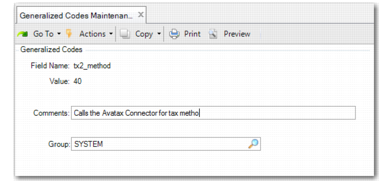
Before you can specify the AvaTax tax method in Global Tax Management Control, you must first define the tax method in Generalized Codes Maintenance (36.2.13).
Generalized Codes Maintenance
Field Name
Specify tx2_method.
Value
Specify 40, which is the standard method for AvaTax.
Comments
Specify a description indicating that this record is for AvaTax method 40.
Group
Specify the value SYSTEM.
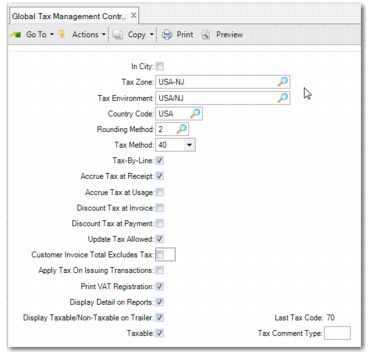
Global Tax Management Control
In Global Tax Management Control (29.24), specify the tax method for AvaTax, which is 40.
Global Tax Management Control
Tax Types
Business transactions can be subject to many kinds of taxes—sales taxes, domestic import duties, inventory transfer taxes, royalty fees, and so on. In GTM, a tax that is specific to a region and is individually calculated and reported is a tax type.
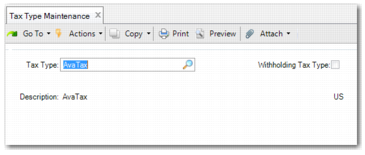
Use Tax Type Maintenance (29.1.1) to create a tax type for use with AvaTax. You do not need to specify a tax legal group. The tax types that must be defined are AvaTax, Country, County, City, State, Special, and Composite.
Note: The Withholding Tax Type field must be cleared for all AvaTax tax types.
Tax Type Maintenance