QAD 2017 Enterprise Edition
>
User Guides
>
Global Tax Management
>
AvaTax
>
Communicating with the AvaTax Portal
Communicating with the AvaTax Portal
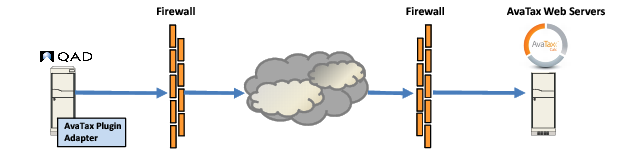
Communication between QAD EE and the Avalara AvaTax portal is performed using Secure Sockets Layer (SSL) encryption. To enable this communication, download an Avalara SSL certificate and install it in the Progress Key Store. This step is part of the installation process for the AvaTax interface. When an SSL connection is established between QAD EE and Avalara, and login details are authenticated, communication between QAD EE and AvaTax is initiated at the following points:
• Address validation in Business Relation Create (36.1.4.3.1), Business Relation Modify (36.1.4.3.2), Company Address Maintenance (2.12), Customer Ship-To Create (27.20.2.1), Customer Ship-To Modify (27.20.2.2), Customer Ship-to Excel Integration (27.20.2.5), End User Create (27.20.3.1), and End User Modify (27.20.3.2)
• During tax calculation in Sales Order Maintenance (7.1.1), Sales Quote Maintenance (7.12.1), Contract Quote Maintenance (11.5.1.1), Purchase Order Maintenance (5.7), Customer Invoice Create (27.1.1.1), Supplier Invoice Create (28.1.1.1), Receiver Matching Create (28.2.1), RMA Maintenance (11.7.1.1), Distribution Order Maintenance (12.17.14), Blanket Order Maintenance (5.3.1), and other related functions
• During Invoice Post and Print (7.13.4)
AvaTax Interface Architecture