QAD 2017 Enterprise Edition
>
User Guides
>
Global Tax Management
>
Implementing GTM
>
Setting Up a Tax Calendar
Setting Up a Tax Calendar
Tax reports are based on tax calendars, rather than the GL calendar, since regulatory requirements for tax reporting are often different from the requirements for GL reports.Tax calendars are entity specific. Tax periods are usually full calendar months, but they are defined with start and end dates to provide for any variations that may be needed.
Since tax authorities set the required reporting periods, tax calendars do not necessarily have a relationship with accounting calendars. If the two calendars are similar, when you create a new tax calendar you can base it on an accounting calendar.
Tax calendars are required and the system checks that financial transactions are within an open tax period. The same check is made when operational transactions are posted.
Each entity within a domain can change the status of a tax period separately by manually updating the status to Locked or Reported. No additional tax transactions can be created when the tax point date is in a locked or reported tax period.
Note: You should coordinate changes in the status of tax periods with the accounting periods, which determines if any postings can be created.
Use Tax Period Create (25.4.4.1) to create periods for tax reporting and Tax Period Modify (25.4.4.2) to manually change the period status.
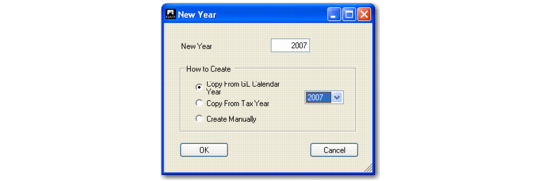
When you choose Create, the following pop-up screen displays. You can create a new year based on either an existing GL year or tax year, or you can create one manually.
Tax Period Create (25.4.4.1)
Field Descriptions
New Year
This field displays the new tax calendar year to create. The default value is the latest tax calendar year, incremented by one.
Copy from GL Calendar Year
Select to use an existing GL calendar year as a template for the new year, and specify the year.
Copy from Tax Year
Select to use an existing tax calendar year as a template for the new year, and specify the year.
Create Manually
Select to create a new year by manually specifying the periods.
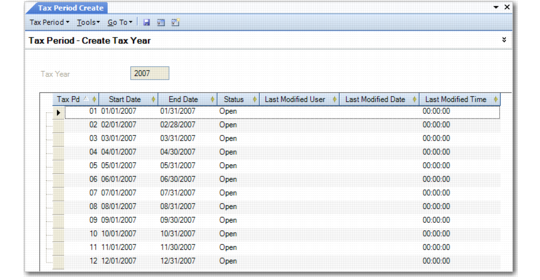
Setting the tax calendar year displays the Tax Period Create screen for defining period dates and attributes.
Tax Period Create, Period Dates and Attributes
Field Descriptions
Tax Year
This field displays the new tax calendar year.
Tax Pd
Specify a period number. By default, periods are numbered 1 to 12. It is possible to create a maximum of 99 tax periods for a tax year.
Start Date
Click the down arrow to select a period start date. This is the official start date of the calendar period.
End Date
Click the down arrow to select a period end date. This is the official start date of the calendar period.
Status
The system displays the current period status: Open, Locked, or Reported. A new period is created with an Open status. You can manually modify the status to locked or reported.
Open: Tax transactions can be created with effective dates in this period.
Locked: Any further tax transactions are prevented.
Reported: Tax reports have been generated and sent to the authorities.
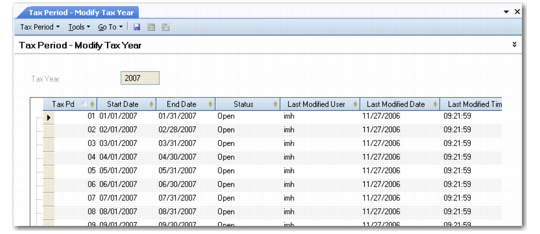
Use Tax Period Modify to modify the period status. You can also delete a period—use the right-click delete row option—if the period is open and no outstanding transactions exist for it.
Tax Period Modify (25.4.4.2)