QAD 2017 Enterprise Edition
>
User Guides
>
Global Tax Management
>
GTM Reporting
>
Tax Registers
Tax Registers
Tax registers let you group accounting transactions for tax reporting, and contain all relevant information to confirm the tax declaration of the company.
Tax Register Create (29.1.17.1) lets you group daybooks for tax register reporting purposes and generates a sequence number that will be used to number pages in final tax register reports. You can then report on the tax registers using the following regional reports:
• AP Tax Register Details (29.6.3.11)
• EU Purchases Tax Register (29.6.3.12)
• EU Sales Linked to EU Purchases (29.6.3.14)
• AR Tax Register Details (29.6.3.16)
• Suspended Tax Register (29.6.3.18)
In some countries, the page numbers of all tax reports must be sequential, by law. The page numbering of a tax register report is composed of a sequence number and a year in the format “Page: 99999999/YYYY.” The sequence number is taken from the Next Page Number field of the tax register used.
You can print tax register reports in two modes: Trial and Final. If you run the report in Final mode, the final page number of the report will be increased by 1 and stored in the Next Page field of the tax register. When you run another final report using the same register, the first page of the next report will be numbered using the value in the Next Page field so that the pages of the two reports are completely sequential. If you run the report in Trial mode, the Next Page field of the Tax Register is not updated.
If you modify a tax register that has been used to generate a final report, the system will display a warning message. You can only delete a tax register if no final report has been generated using it.
Example:
A company wants to report on the tax amounts for all supplier invoices raised from suppliers within the European Union.
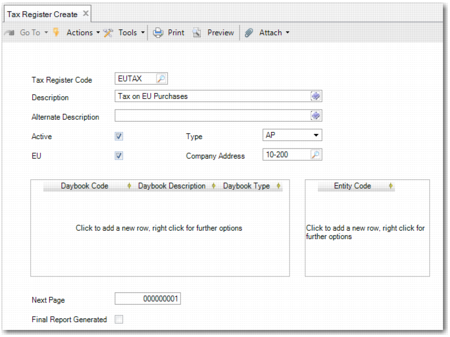
The accountant creates a tax register, EUTAX, using Tax Register Create, specifies a type of AP, selects the EU field, specifies all AP daybooks that are used for supplier invoices, and specifies the entities to report on.
The accountant then runs the AP Tax Register Details report using the newly created tax register.
Tax Register Create
Tax Register Code
Specify a maximum of eight characters for the tax register code. This field is mandatory.
Description
Enter a brief description (maximum 40 characters) of the tax register. You can optionally enter descriptions in more than one language. This field is mandatory.
Alternate Description
Enter an alternative description for the tax register. This field is optional. If you complete this field, the contents display in the Description field of the report EU Sales Linked to EU Purchases (29.6.3.14).
Active
Indicate if this is an active tax register.
Type
Select the type of daybook set for which the tax register will apply. The options are AR and AP.
AR: If you set the Type field to AP, you can only specify daybooks of type Supplier Invoice, Supplier Credit Note, Supplier Invoice Correction, and Supplier Credit Note Correction in the Daybook grid.
AR: If you set the Type field to AR, you can only specify daybooks of type Customer Invoice, Customer Credit Note, Customer Invoice Correction, and Customer Credit Note Correction in the Daybook grid.
EU
Select the field if the tax register will be used to report on transactions in EU countries only.
Company Address
Specify the company address to print at the top of the report.
Daybook Code
Specify a daybook that you want to add to the tax register group.
Daybook Description
This field displays the description of the daybook you specified in the Daybook Code field.
Daybook Type
This field displays the daybook type of the daybook you specified in the Daybook Code field.
Entity Code
Specify one or more entities to report on.
Next Page
This field displays the sequence number generated and assigned to the tax register.
If the last final tax register report you produced ended on page 35, the next final tax register report must begin on page 36. Printing a report as final updates saves the page numbers.
Printing a tax register report in Trial mode does not update the page numbering.
Final Report Generated
The system automatically selects this field if a final tax report has been generated using the tax register.