Item Attribute Categories
Overview
Use the Attribute Categories function to browse, create, and maintain attribute categories that you can use with item attributes. For certificate of analysis functions, the system uses attribute categories to organize and label groups of attributes.
Within collections, selections you make at the top of the display cause the supporting data within other supporting browses and functions in the collection to reflect your selection.
You can identify ways that attributes are classified for items, then create attribute categories for each classification. In some cases, an attribute can belong to multiple attribute categories. For example, you can create attribute categories for:
• Classes and sub-classes of attributes that need to be verified or measured when items are received or produced.
• Item attributes that have values that you need to maintain, store, and report for inventory quantities and/or item lots.
• Item attributes that have specifications that you need to communicate to suppliers or customers.
• Item attributes that have specifications and typical or actual values that you need to communicate to suppliers or customers.
Creating Item Attribute Categories
Follow these steps to set up attribute categories:
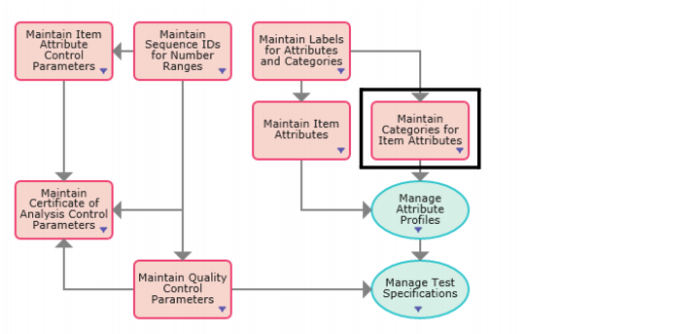
1 Open Attribute Categories by selecting Maintain Categories for Item Attributes from the Manage Enterprise Item Attributes process map.
Manage Enterprise Item Attribute Process Map
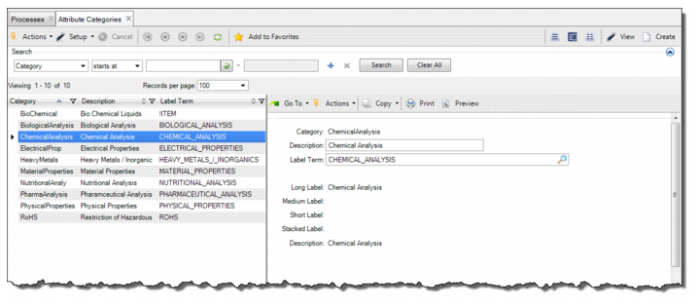
2 The Attributes Category browse displays a list of item attribute categories. To create a category, click Create.
Attributes Categories
3 Enter the required information in the following fields:
Category
Enter a unique identifier for the attribute category.
Note: Attributes can be classified in different ways and optionally have one or more attribute categories to classify them.
Description
Enter a short description of the attribute category.
Label
Select a valid label term defined in Label Master Maintenance. The system uses this term and the defined attribute to determine the label that displays on the user interface.
Note: If the value for Label Term is left blank or if a label master record does not exist for the label term, the attribute functions display the attribute description in place of a label.
Long Label
Displays the Label Term’s primary display label from the label master record.
Medium Label
Displays the Label Term’s medium display label from the label master record. The medium label is only displayed if the long label is too long to display on the screen.
Short Label
Displays the Label Term’s short display label from the label master record. The short label is only displayed if the long and medium labels are too long to display on the screen.
Stacked Label
Displays the Label Term’s stacked display label from the label master record.
Description
Displays the Label Term’s description from the label master record.