Entering Values During Receipt Transactions
Follow these steps to enter the item attribute values during a PO or WO receipt:
1 Open the PO or WO receipts function and enter the PO/WO number.
3 Enter the lot number in the Lot/Ser field and click Next.
Note: Lot attributes require an associated lot. You can only generate a lot attribute or lot attribute order if you specify a lot or serial when receiving an order.
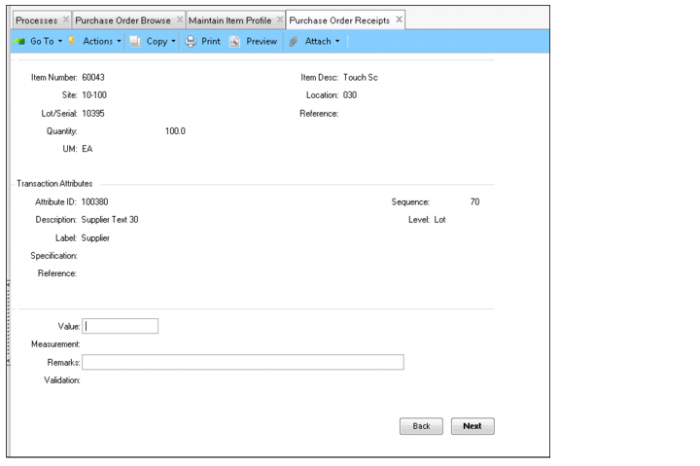
4 Enter the required information in the fields. Repeat this step until you have entered values for all attributes.
Entering Attribute Values During a PO Receipt
Attribute ID
Use the lookup to select an attribute. The lookup displays a list of the attributes associated with the item being received.
Sequence, Description, Level, Label, Specification, and Reference
Displays the information for the attribute that was selected.
Value
Enter the attribute value in this field.
Measurement
Displays how the attribute is measured or determined. For example, a measurement for flow rate might be expressed as “psi" or “liters/min.”
Remarks
Optionally, enter any remarks in this field.
Result
Displays the result of the attribute value (Not Entered, Conforming, or Non-Conforming).
5 Once you have entered all the values for the attributes, click Back to finish receiving the PO.
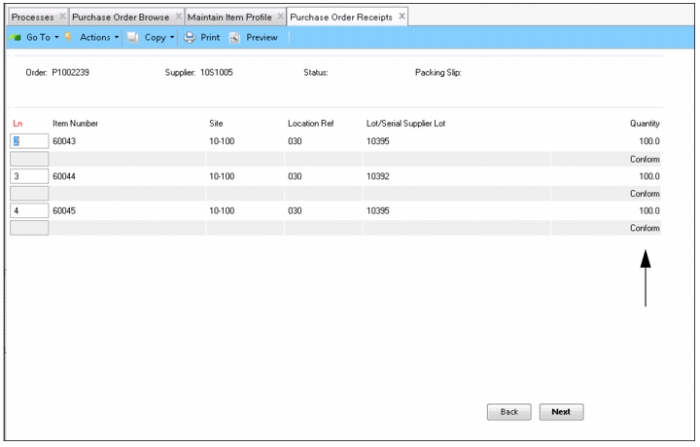
6 Once you have received all the lines on the PO, you can view the lines for the order and the results for each lot.
Checking Attribute Value Results During PO Receipt