View Item Lots
Use View Item Lots to view and monitor changes to lot attribute values. Access the View Item Lots collection from the following process maps:
• Manage Inventory with Attributes
• Manage Production with Attributes
• Manage Purchasing with Attributes
• Manage Sales with Attributes
• Manage Test Records and Quality Orders
• Inspect Inventory
• Inspect Production Receipts
• Inspect Purchasing Receipts
• Inspect Inventory for Sales Order
View Item Lots Collection
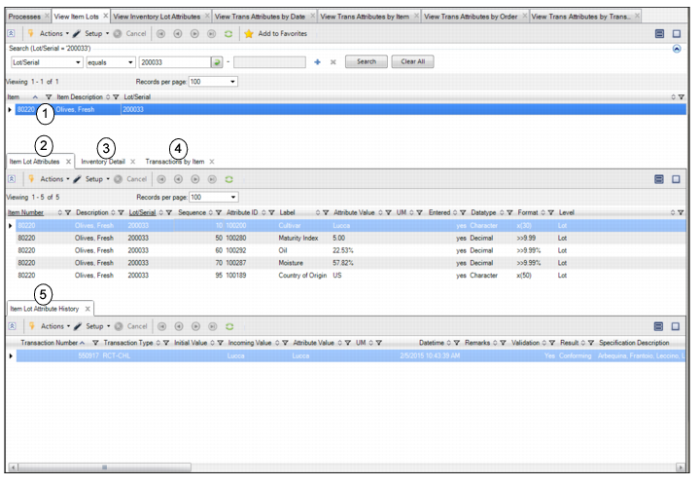
The View Item Lots collection contains the following browses and tabs:
1 Item Lots browse. Displays a list of item lots.
2 Item Lot Attributes tab. Displays the attribute data for the selected item lot.
3 Inventory Detail tab. Displays the inventory detail for the selected item lot.
4 Transaction by Item tab. Displays transaction history and attribute changes for the selected item lot. This tab displays the same information as the View Transaction Attributes by Item collection.
5 Item Lot Attribute History tab. Displays transaction history for the selected lot attribute.