Materials Management with Lot Attributes
Monitor Materials for Production
The Monitor Materials for Production collection provides a thorough view of materials for work orders. Use this collection to:
• Monitor if available and allocated inventory conforms to specifications.
• Drill down and determine why a lot is non-conforming.
• Plan material allocations for production.
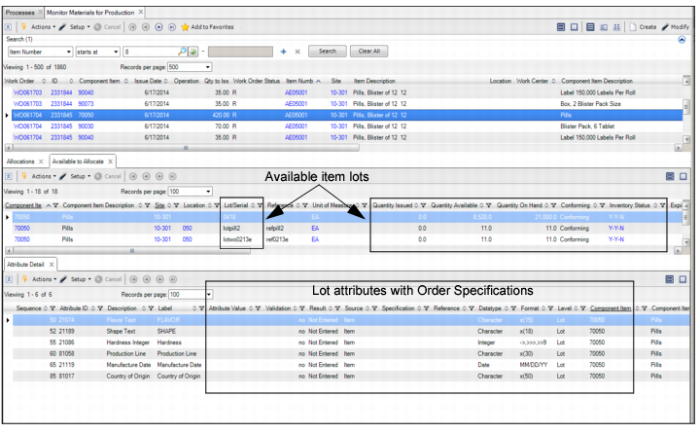
When you select an item in the top-level browse, the Allocation, Available to Allocate, and Attribute Details tabs display the following information:
• Allocations tab. Displays the current allocations for the item on the selected work order.
• Available to Allocate tab. Displays if there are any available item lots to allocate for the item on the selected work order.
• Attribute Detail tab. Displays the attributes associated with the selected item.
Monitor Materials for Production
Production Order
When editing or creating production orders, if attributes, attribute values, and attribute specifications were set up for the item or work order component, the system displays the Edit Specification field in Production Order Maintenance. You can create a new attribute specification for the production order.
Production Allocations or Transfers
When you select and allocate an inventory quantity for the order, the system validates the allocation quantity using the attribute values and the attribute specifications for the item. Then, the system creates the allocations for qualified inventory quantities. You can create and print picklists with attributes and specifications.
Likewise, when transferring materials for Advanced Repetitive production, the system determines the item attribute specifications that are specific to a component item on a production order. Then, the system qualifies inventory quantities to allocate with the attribute specifications for the item and creates allocations for qualified inventory quantities.
Issue Inventory for a Production Order
When you select inventory quantities to issue for the component item, the system validates the quantity using the attribute values and the attribute specifications for the item.
When issuing inventory, the system issues default inventory quantities using quantities that have been allocated or picked. It considers the attribute specifications for each item, and the attribute values for the inventory quantities to issue, based on your setup.
The system lets you view the inventory quantities that are selected to issue to an order and provides the option to view the attribute values and specifications for quantities to issue. You can also view inventory quantities that:
• Are available to issue and conform to the attribute specifications for the item
• Are not allocated and do not conform to the attribute specifications for the item
Production Receipt
For a production receipt, the system presents default data values for attributes, and lets you view attribute specifications. When required, the system accepts, validates, and processes user input for attribute values. It validates attribute values from the processing of the transaction on a lot attribute order or quality order for the production receipt.
The system records attribute values for production receipts, creating a quality or lot attribute order with attribute values and specifications.
Finally, the system updates inventory, item lot, and transaction audit data records with attribute specifications and values.