IAQ and QAD QMS Process Flow
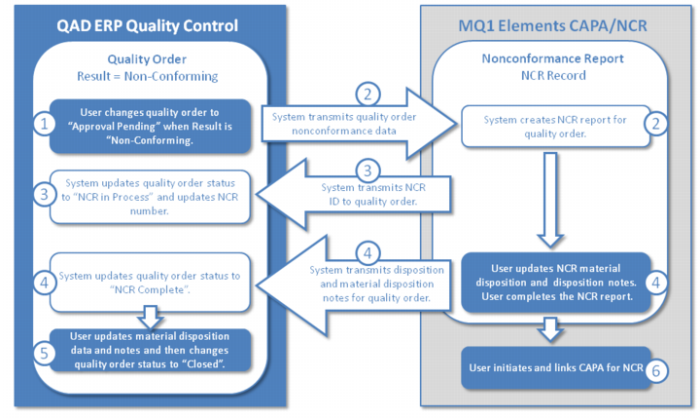
The following graphic and steps describe the process flow when IAQ is integrated with QAD QMS for NCR/CAPA:
1 The process is initiated when the user changes the quality order status to “Approval Pending” and the quality result is “Non-conforming.”
2 The system transmits the non-conformance data for the quality order to QAD QMS and then QAD QMS creates an NCR report for the quality order.
3 The system transmits the NCR ID to the quality order and updates the quality order status to NCR In Process.
4 After the user updates the NCR material disposition, adds disposition notes, and completes the NCR in QAD QMS, the system transmits the disposition and material notes to the quality order by updating the status to NCR Complete.
5 Based on the material disposition data, the user performs the necessary material transactions (scrapping, location transfer, and so on), completes the quality order, and changes the status to “Closed.”
6 In QAD QMS, the user initiates and links the CAPA with the NCR report.
Scenario for NCR and Material Disposition
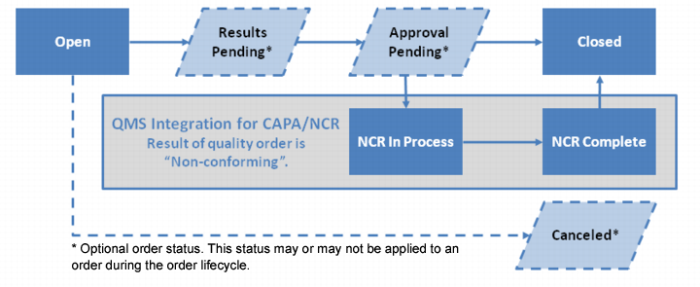
The following graphic shows the lifecycle of a quality order when IAQ is integrated with QAD QMS.
Lifecycle of a Quality Order with QMS Integration