QAD 2017 Enterprise Edition
>
User Guides
>
Item Attributes and Quality Control
>
Introduction
>
Introduction to Item Attributes and Quality Control
Introduction to Item Attributes and Quality Control
Item Attributes
Item attributes provides capabilities to address two basic business use cases:
• Defining and managing item attributes for an item
• Defining and maintaining lot attributes for an item lot (or lot and sublot)
Defining and Managing Item Attributes for an Item
Item attributes provides the capability to define and manage item attributes for any number of characteristics that describe an item. You can maintain item attributes for characteristics that supplement item master fields such as description, design group, promo group, item type, and group. You can define item attributes for characteristics such as those that describe appropriate use, application, packaging, shipping, handling, storage, and disposal of an item. These attributes are visible on selected browses and can be included on print functions for production and sales.
Defining and Managing Item Attributes for an Item Lot
Item attributes provides the capability to define and maintain lot attributes for characteristics that describe an item lot (or lot and sublot). You can define lot attributes to provide visibility of attribute values that can vary from one material lot to another, to qualify materials, and to access more detailed records for lot transactions. You can define lot attributes together with specifications for characteristics such as the engineering revision level, best-by date, or country of origin. Lot attributes enable you to manage materials for the execution of enterprise operations, such as allocating, picking, issuing, and qualifying material lots for enterprise operations using lot attribute values and the specifications that apply.
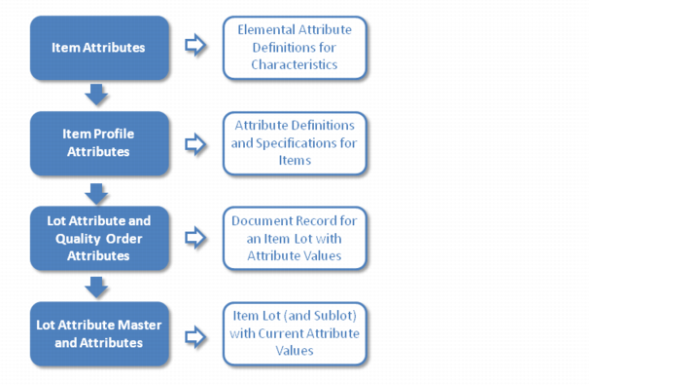
Item Attributes — High-Level Solution Architecture
Item attributes and item lot attributes are supported at the lowest, most fundamental level, by attributes for characteristics that can be applied to one or more items. Each item attribute is defined by a universal identifier, description, label, and data parameters. These attributes are reserved for items, and not for application to other things such as customers, suppliers, sites, production lines, and so forth.
At the second level, attribute profiles provide the means of linking the predefined attributes that apply to each item. With attribute profiles, you can define the default value and specification for each attribute for an item.
At the third level, lot attribute orders (and quality orders) provide document records for updating values for lot attributes for lot master records. Values for lot (and sublot) attributes can optionally be entered when receiving inventory from suppliers or production, and by using a lot attribute or quality order.
At the fourth level, lot attribute master records include the information necessary to provide visibility of the attribute values for a lot (or sublot). This is used by functions that pick, issue, backflush, and ship material lots, that select conforming material lots, and that exclude and warn against using non-conforming lots.
Diagram for High-Level Item Attributes Architecture
Lot attribute master data is independent from inventory detail attributes for expire date, grade, and assay. Points of data entry include:
• Receipt transactions from suppliers on purchase orders
• Receipts from production on work orders or a repetitive schedule
• Receipt into a location by a transfer transaction
• Unplanned inventory receipts
• Lot attribute orders created by receipt transactions or created manually
• Quality orders when there are test specifications