QAD 2017 Enterprise Edition
>
User Guides
>
Intrastat
>
Extrastat
>
Setting Up Extrastat
Setting Up Extrastat
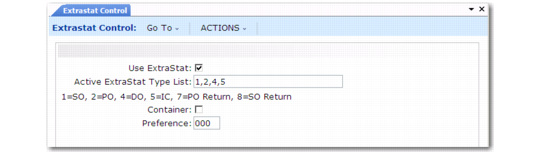
Extrastat uses all of the same data values set up for Intrastat, such as terms of delivery and nature of transaction codes. In addition, you can specify some control settings that are Extrastat-specific using Extrastat Control (29.22.21.24).
Extrastat Control (29.22.21.24)
Use Extrastat
Indicate whether to enable Extrastat functionality.
No: Extrastat history records are not created automatically.
Yes: The system automatically creates Extrastat history records (ieh_hist) for extra-EU inventory movements.
Active Extrastat Type List
Specify the type of transaction or document where the system will prompt for Extrastat data or give you the opportunity to edit Extrastat data.
Valid entries are 1, 2, 4, 5, 7 and 8.
Enter the numbers, in a comma-separated list, that correspond to the type of transaction or document for which you want to enable the creation and modification of Extrastat data:
1 Sales Orders
2 Purchase Orders
4 Distribution Orders
5 Intersite Transfers
7 Purchase Order Returns
8 Sales Order Returns
Container
Specify whether goods are transported with a container. Valid entries are:
1: The goods are transported with a container.
0: The goods are not transported with a container.
This field is required for Netherlands-specific Extrastat transactions.
Preference
Enter a code that specifies the preferred rate used for custom taxes. This must be specified when importing goods from developing countries.
This field is required for Netherlands-specific Extrastat transactions.