QAD 2017 Enterprise Edition
>
User Guides
>
Lean Manufacturing
>
Managing Kanban Cards
>
Manage Kanban Loops
Manage Kanban Loops
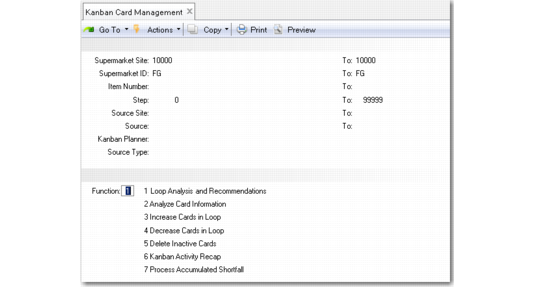
Use Kanban Card Management (17.3.16) to manage multiple loops by:
• Analyzing and optionally implementing system-generated recommendations to create, activate, close, or inactivate cards to reconcile the loops by bringing them into conformance with optimum loop sizing
• Adding or removing a fixed number of cards from each selected loop
• Deleting inactivated cards when they are no longer needed
• Adding new limited-use cards to compensate for cumulative receipt shortages resulting from scrap
• Printing new or activated cards directly from this program
Most of the functions include an Update field. Set it to No to review the effects of the selection criteria entered before actually updating the database.
To use the program, enter selection criteria to identify one or more kanban loops. Then choose the function you want to perform on the selected loops. The system displays additional fields specific to that function. After you finish, focus returns to the Function field; you can continue to use additional card management features on the same loops without having to reenter selection criteria.
Kanban Card Management (17.3.16)
The system maintains running totals of cards created, activated, closed, and inactivated during the current session. When cards have been created or activated, use function 6, Kanban Activity Recap, to print these cards before exiting. See
Printing Cards.
The following sections describe the available functions.