Initial Frames
Two optional frames may display when the program is launched, depending on settings in Kanban Control (17.24):
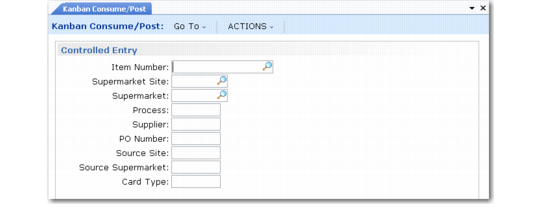
• When Controlled Kanban Entry is Warning or Error, several optional criteria fields display in the initial frame. When you begin recording cards, the system validates them against the values you enter and displays warning or error messages when a card does not match one of the settings. For example, you can enter a range of item numbers to avoid accidentally recording a card for the wrong item. When Controlled Entry is None, the frame does not display.
Kanban Consume/Post (17.6.1), Controlled Entry Frame
• When Allow Entry of Effective Date is Yes, you can change the effective date of the kanban transactions. Otherwise, the system uses the current date.
Kanban Consume/Post, Effective Date Frame
Only when you are recording transactions using Kanban Consume/Post, you can add an optional point-of-use reference for move cards. For example, this can be the location code of the process that uses the items. The system applies the same point-of-use reference to all cards entered during the session. You can update the POU reference using Kanban Card Maintenance (17.3.1) or Kanban Multi-Card Maintenance (17.3.2).
Kanban Consume/Post, POU Reference Frame