Maintaining Dispatch Records
Use Kanban Dispatch Maintenance (17.5.2) to:
• View dispatch-related information associated with a specific card that has been authorized for replenishment and communicated to the loop supplier using Kanban Dispatch List Processing.
• Update several values associated with the kanban dispatch cycle.
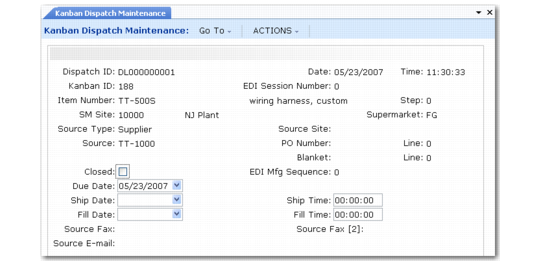
Dispatch ID and Kanban ID are required fields. Select a dispatch ID and kanban card ID to display several items of information from the detail record, such as:
• Loop identification information, including the item, step, supermarket, and so on.
• Dispatch list information, including the dispatch date and time, as well as transmittal information for fax and e-mail lists.
• For lists transmitted using EDI eCommerce, the system-displays two system-assigned numbers. These fields are always set to 0 for non-EDI lists.
• The EDI session number assigned when the system attempts to start the EDI load process. You can use this number in EDI eCommerce to track errors that occurred during list processing.
• The sequence number assigned when the card record is successfully loaded into the application document repository.
Most of the fields are display only. Depending on card-related events, the date and time fields may include system-created data. As required, you can update them. For example, you might want to associate a ship date with a dispatched card even though it has not been recorded in Kanban Ship.
Kanban Dispatch Maintenance (17.5.2)
Closed
Specify whether this kanban card dispatch record is closed. When this is Yes, the card has completed the dispatch cycle associated with the current dispatch ID.
When a card is dispatched, this field is set to No. The system updates it to Yes when one of the following takes place:
• The card is recorded as received.
• On a process loop for a FIFO operation, the card is recorded as shipped, but actually is just moving to a subsequent FIFO operation.
• Even if one of those events has not occurred, the card has been dispatched again.
You can update this field manually.
When Closed is Yes, the system does not update the ship or fill date when an associated event takes place.
Due Date
Optionally enter or update the date this kanban is due to be filled at the destination supermarket.
This defaults from the date on the card detail record.
Ship Date and Time
Optionally update or enter the date and time (based on a 24-hour clock) this kanban was shipped by the supplier.
The system updates this field when:
• The card is recorded in Kanban Ship.
• An ASN associated with the card is processed by EDI eCommerce Document Import.
Fill Date and Time
Optionally update or enter the date and time (based on a 24-hour clock) this kanban was filled.
The system updates this field when:
• The card is recorded in Kanban Fill/Receive.
• A shipment associated with the card is received using PO Shipper Receipt.