QAD 2017 Enterprise Edition
>
User Guides
>
Lean Manufacturing
>
Flow Scheduling
>
Closing Flow Scheduled Orders
Closing Flow Scheduled Orders
When flow scheduled orders are completely filled or are no longer needed, you can close them. For example, you might want to do this so that additional completions cannot be recorded for an order with an open quantity that is no longer required.
Note: Before you record any completions for an order, you can simply delete it using Flow Schedule Maintenance (17.13.3). However, you cannot use that method to delete an order that includes a value in the Completed field. Instead, close the order and then delete it using Flow Delete/Archive (17.1317.13.23).
The methods you can use to close an order depend on whether it references a standard work order:
• When the flow scheduled order has a value in the Work Order field in Flow Schedule Maintenance, you can update the associated work order using programs on the Work Orders menu. The system synchronizes the changes on the flow scheduled order. For example, when you change the Status field in Work Order Maintenance (16.1) to C (closed), the system displays CLOSED next to the Completed field in Flow Schedule Maintenance. Reopening the work order also reopens the flow scheduled order.
The system also synchronizes changes in the other direction. When you close the flow scheduled order, the Status field on the associated work order in Work Order Maintenance is automatically set to Yes.
• Although flow scheduled orders with a blank Work Order field are associated with a system-maintained type W work order, you cannot close that work order with any programs on the Work Orders menu. Use Flow Schedule Close (17.13.19).
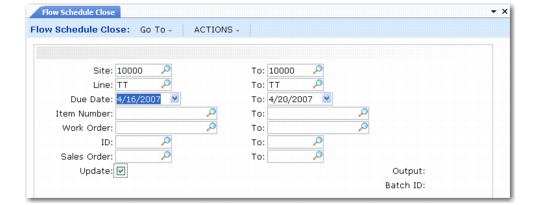
In Flow Schedule Close, enter selection criteria to identify flow scheduled orders to be closed. To review a report on the effects of the selection criteria before updating the database, first run the program with Update set to No.
Flow Schedule Close (17.13.19)
System-generated type W work orders are automatically deleted when you close the associated flow schedule with this program. This action has no accounting effects, since these take place when you record completions using Flow Schedule Receipts.
After you run this program, the system displays CLOSED next to the Completed field in Flow Schedule Maintenance. You cannot update closed orders, export them to the Repetitive module, or record receipts for them, even if they have open quantities. Closed flow scheduled orders remain in the system until you run Flow Delete/Archive, which gives you the option of selecting only closed scheduled orders.