QAD 2017 Enterprise Edition
>
User Guides
>
Master Data
>
Items/Sites
>
Sites
>
Creating Site Connection Records
Creating Site Connection Records
When you click Next after the first frame of Site Maintenance in a multiple-domain environment, you can optionally create connection records in related domains when you create a new primary site.
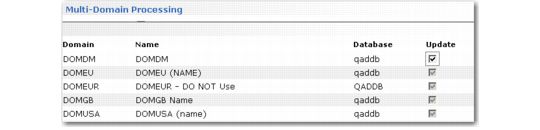
The system generates a list of active domains in the current database and all databases defined in Database Connection Maintenance. You can choose which domains to update from this list.
Before the list displays, you are prompted to set a default for the Update field. Set this to Yes if you want to create connection site records in most related domains. You can then change exceptions to No.
Creating Connection Records
Note: In a multi-database environment, all databases must be connected or you cannot create a new primary site record. This is to ensure that the site does not already exist as a primary site in a domain in another database. This is also true when you delete a primary site, although in this case, additional restrictions may prevent you from deleting the site.
Most of the data associated with the site connection record defaults from the primary site record but is validated in the target domain:
• The entity associated with the site is set to the primary entity of the domain where the connection record is being created.
• The connection record is created with the primary site’s default inventory status if the inventory status is valid in the connection domain. Otherwise, the first inventory status in that domain is used.
• The site connection record is created with the same Transfer Clearing account, sub-account, and cost center as the primary site if this combination is valid in the target domain. Otherwise, the value from Inventory Accounting Control (36.9.2) in the target domain is used. If this is not found, the value from Domain/Account Control (36.9.24) in the target domain is used.