QAD 2017 Enterprise Edition
>
User Guides
>
Master Data
>
Pricing
>
Using Best Pricing
>
Setting Up Item Price Break Categories
Setting Up Item Price Break Categories
Price break categories let you assign volume price breaks for multiple items. Discounts can be calculated based on the quantity or amount ordered on multiple lines of a sales order or quote.
Example: One hundred green bicycles are ordered on line 1 of a sales order, 100 red bicycles on line 2, and 200 bicycle reflectors on line 3. The reflectors receive a price break based on the quantity of bicycles ordered (200)—not the quantity of bicycles plus reflectors (400). The bicycles also receive a price break based on the number of bicycles ordered (200).
Cumulative Price Break Categories
There are two ways to take advantage of price break categories:
• Accumulate quantities on related items by assigning the same price break category to each item.
• Offer discounts on accessory items by assigning a price break category to a price list to which the accessory item belongs and to the item master of the accessory item’s principal item.
Note: An item that qualifies for a price list but does not belong to a price break category receives the price or discount associated with the price list. The price or discount is based on the accumulated quantity of the line items that belong to the price break category. This is illustrated in the following example.
Example: Price list A specifies a discount of 25% on a quantity (total items) of 100. The sales order items are as follows:
• Line 1 reflectors, Qty = 25
• Line 2 bells, Qty = 25
• Line 3 streamers, Qty = 25
• Line 4 horns, Qty = 25
• Line 5 tires, Qty = 2
• Line 6 seats, Qty = 1
Price list A has a price break category of Accessories. Reflectors, bells, streamers, and horns belong to price break category Accessories. Tires and seats do not belong to this price break category but do qualify for price list A. All line items receive the discount of 25% from price list A since the quantity of the items that qualify for the break category equals 100 (the total of pumps, bells, streamers and horns is 100).
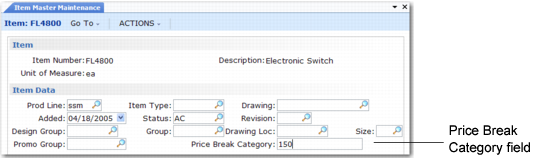
Enter break categories in Item Master Maintenance (1.4.1) and Price List Maintenance (1.10.1.1).
Price Break Category Field of Item Master Maintenance (1.4.1)
Item Number
Enter an item code.
Price Break Category
Enter a category name. Name price break categories as you like, but make sure that you enter the same names on price lists and other items.