QAD 2017 Enterprise Edition
>
User Guides
>
Master Data
>
Pricing
>
Using Best Pricing
>
Understanding Sales Order Maintenance Fields
Understanding Sales Order Maintenance Fields
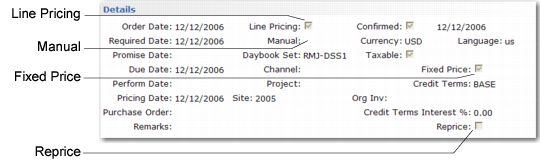
Several fields in Sales Order Maintenance (7.1.1) relate to best pricing.
Pricing Fields in Sales Order Maintenance (7.1.1)
Line Pricing
Affects only newly created orders. On existing orders, it defaults to No and cannot be changed. For new orders, it defaults from Price SO by Line in Pricing Control (1.10.1.24). Enter Yes to have the system recalculate price breaks for the order as lines are entered. Enter No to recalculate only once, when order entry is complete.
Manual
Enables you to manually enter a price list code to be considered for order lines. This price list must be set up with Manual set to Yes in Price List Maintenance (1.10.1.1). Manual price lists do not necessarily determine the order line price, but are used in conjunction with other price list search algorithms to determine the best price.
Fixed Price
Sets the default for each line added to the order. Only lines with Fixed Price set to No are updated by Sales Order Repricing (7.1.11). Defaults from the Fixed Price setting defined for the Sold-To address.
This use of fixed price should not be confused with fixed prices as used in service pricing, which enable the customer to be invoiced for a fixed price regardless of the actual cost of items, labor, and expenses recorded.
Reprice
Enter Yes at the order header to have the system reprice modified line items. The system also reprices other line items belonging to the same break category as a modified item. Otherwise, enter No. If No, you can still reprice line items individually in the order detail pop-up window. If Reprice is No on the order header and you enter a new line, the system automatically reprices it. This field only affects the current maintenance session.
Important: The value of Fixed Price, not Reprice, determines which orders are repriced by Sales Order Repricing.
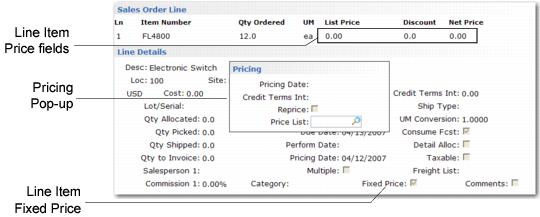
Sales Order Line Item Price Fields
Pricing Date
This field defaults from the order header. The system uses the pricing date as the effective date in determining prices for this line item. The field is editable only if Vary Pricing Date by SO Line in Sales Order Accounting Control is Yes. When the control program field is No, the Pricing Date of the order header is used and cannot be changed on individual lines. When you update the header, the system automatically changes the date on all lines.
Credit Terms Interest %
Credit terms interest for this line. This field defaults from the header. You can edit the value on individual lines only if Vary Pricing Date by SO Line in Sales Order Accounting Control is Yes. When the control program field is No, the header value is used and cannot be changed on individual lines. When you update the header, the system automatically changes the Credit Terms Interest % field on all lines.
Reprice
Editable only if Reprice is No in the order header. In this case, you can select individual line items for repricing. When set to Yes for a line, the List Price, Discount, and Net Price fields can be edited, and if the original price was calculated by the system, it is automatically recalculated.
Manual
Defaults from the Manual field in the sales order header. You can specify a different manual price list for this line, as needed. This field only has effect if Reprice is Yes.
Fixed Price
Initially defaults from the order header, but can be unique for each line. Determines whether this sales order line is considered by Sales Order Repricing (7.1.11) and whether automatic repricing can occur for this line item in Sales Order Maintenance.