PCO Release and Distribution
After a PCO is approved, it is ready to be released and distributed. Releasing a PCO typically means transferring ownership of it from a design organization to a manufacturing or production organization. Distributing means notifying members of a distribution group of a PCO’s release. This can be done with hard-copy reports or e-mail, depending on how the routing slip is set up.
Use Release and Distribution (1.9.7.1) to release and distribute PCOs. Release and distribution are initiated at the same time, but are recorded as separate points in the PCO life cycle. When a released PCO is distributed through a standard batch processing queue, significant time may elapse between release and actual distribution. Once a PCO is distributed, its release is final.
Note: Since PCRs cannot be released to production, they are never listed on the screen.
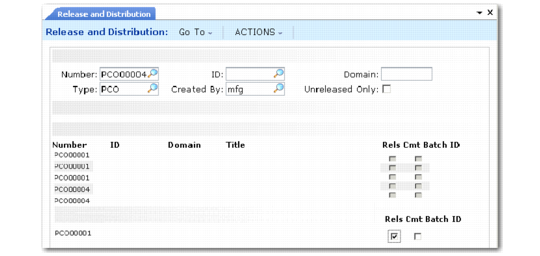
Release and Distribution (1.9.7.1) lists PCOs by criteria entered at the top of the screen. Enter a PCO number to list PCOs beginning with that number.
Release and Distribution (1.9.7.1)
Unreleased Only
Enter Yes to view only unreleased PCOs. Enter No to view both released and unreleased PCOs, or to revoke a previously released, but not yet distributed, PCO.
Rels
Enter Yes to release the PCO, or No to unrelease it, assuming the PCO has been released but not yet distributed.
Batch ID
Specify a batch queue for printing release notices. Leave blank to print notices immediately. Since actual distribution of PCOs occurs only after reports are printed, queuing may result in lag time between release and distribution.