QAD 2017 Enterprise Edition
>
User Guides
>
Master Data
>
Product Change Control
>
Importing and Exporting PCRs and PCOs
Importing and Exporting PCRs and PCOs
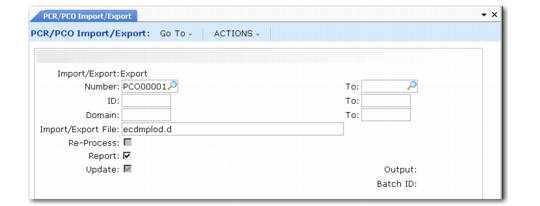
Use PCR/PCO Import/Export (1.9.13) to export closed PCO data to an ASCII file for import into another database or application, such as a Product Data Management system.
PCR/PCO Import/Export (1.9.13)
Use the import function to restore archive files created by PCR/PCO Delete/Archive (1.9.15), which is similar to standard delete/archive programs.
Important: You cannot restore PCR/PCO archive files using the standard Archive File Reload (36.16.5).
Re-Process
Only available when you are importing data. Enter Yes to have the Type and Design Group of imported PCRs and PCOs set to blank. The closed status is also removed and set to blank. This enables you to assign new types and design groups appropriate for the new domain. If No, a PCO with a Type and Design Group combination that does not exist in the new domain is not imported.