QAD 2017 Enterprise Edition
>
User Guides
>
Master Data
>
Regulatory Attributes
>
Changing Inventory Detail Records
Changing Inventory Detail Records
Use Multi-Lot Inventory Detail Update (1.22.19) to change assay %, grade, status, and expire date attributes for a particular item number and lot/serial combination.
Warning Use this feature with caution. The only way to restore old inventory attribute values is to reassign them using this update. If you change all values for a record type to a new value, you cannot recover the original values.
Assay %, grade, expire date, and inventory status can have field security implemented to limit access to any or all of the fields. Use Field Security Maintenance (36.3.15.1) to enter the names of fields you need to restrict. Users must have explicit authority to access secured fields.
Use the following procedure to update inventory detail records:
1 Choose Multi-Lot Inven. Detail Update (1.22.19) from the Regulatory Attributes Menu.
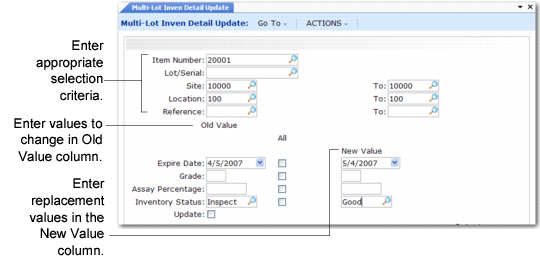
Multi-Lot Inven. Detail Update (1.22.19)
2 Enter a value in Item Number. The first lot number displays if inventory exists for this item.
3 Use the lot number that displays, enter a new lot number, or clear the Lot/Serial field to update items with blank lot/serial numbers.
4 Enter, singly or by range, sites, locations, and references for which you have access privileges.
Note: Leaving Site, Location, or Ref blank changes inventory attributes for all sites, locations, and lot references.
5 Enter old attribute values, set the All fields, and enter new attribute settings in the lower half of the frame.
Old Value
Enter the value to be changed.
All
If Old Value is blank and All is Yes, all values are changed to New Value. If Old Value is blank and All is No, only blank values are changed to the New Value. The field defaults to No. You can change it to Yes only when Old Value is blank.
New Value
Enter the replacement value for the field.
6 Set Update to No and run the program as a report first to make sure you have entered the correct values.
7 When you are satisfied with the new values and the item, lot, and site data listed on the report, change Update to Yes and run the program again.