Entering Control Numbers for Items
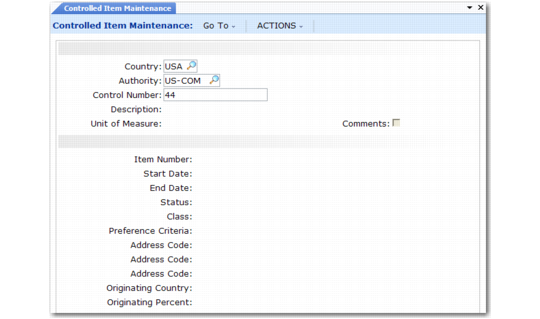
Use Controlled Item Maintenance (1.22.16.10) to associate control numbers with items.
This programs can be used to store many types of codes, such as codes associating DEA registration numbers with items, foreign tax identification numbers, or other codes associated with items.
Controlled Item Maintenance (1.22.16.10)
Enter the country code and authority or leave Country blank if this record applies to all countries. Then specify the control number associated with one or more items. Only active country codes are available.
Every product that is exported from the United States requires an Export Control Classification Number (ECCN). These are defined in the U.S. Commerce Control List.
Other fields apply to common control requirements or can be used as needed.
Status
Enter a user-defined status. If your company requires Harmonized Codes for NAFTA, use this field to enter a Producer Status.
Class
Enter a user-defined class. If your company requires National Drug Code (NDC) numbers, use this field to enter drug classes, such as class 1, 2, or 3. If your company is NAFTA compliant, use this field to enter a Regional Value Content (RVC) value.
Preference Criteria
Enter a user-defined preference criteria. If your company is NAFTA compliant, use this field to enter appropriate codes.
Address Code
Enter up to three addresses associated with the item, such as the primary ship-from site or primary exporter.
Originating Country
Enter the code for the country where this item is usually manufactured.
Originating Percent
Enter the percentage of the item that is usually manufactured in the Originating Country.